
Zapier Won't Sign a BAA: HIPAA Steps U.S. Clinics Must Take
Zapier won't sign a BAA. Learn which PHI workflows to stop, the vendor checks U.S. clinics must run, and how to build an audit-ready, BAA-covered...

Zapier Won’t Sign a BAA: HIPAA Steps U.S. Clinics Must Take

Zapier is not HIPAA compliant, and the company says so itself: it will not sign a Business Associate Agreement, full stop. If your clinic, pharmacy, or practice is routing patient information through a Zap right now, stop that workflow today and start evaluating a BAA-covered alternative or a tokenization gateway instead. HHS is clear on what triggers the requirement, and Zapier doesn’t meet it.
TL;DR:
- Zapier is not HIPAA compliant and will not sign a Business Associate Agreement, making it unsuitable for handling protected health information.
- Data stored in Zapier might be logged, retried, or duplicated through subprocessors, increasing risks of PHI exposure outside healthcare compliance controls.
- For workflows involving PHI, practices should use platforms with a signed BAA, or implement a gateway and tokenization system that keeps PHI within covered systems.
- Small practices should primarily rely on EHR-native automation tools, while larger organizations need enterprise platforms like Microsoft Power Automate or Workato with BAA agreements.
- Before selecting an vendor, verify subprocessors, data storage locations, retention policies, and request detailed SOC 2 reports to ensure compliance and security standards.
Table of Contents
- Why Zapier Isn’t HIPAA Compliant (And Why That Surprises People)
- The Real Risks When PHI Slips Into a General-Purpose Automation Tool
- Where Zapier Still Works: Non-PHI Automation Done Right
- HIPAA-Compliant Alternatives and Architectures for U.S. Healthcare Automation
- What to Verify Before You Sign With Any Automation Vendor
- How KLYR Media Builds HIPAA-Compliant Automation for Healthcare Clients
- The Tradeoff Nobody Wants to Admit
- Get a HIPAA Compliance Review for Your Practice’s Automation
- Where to Verify the Rules Yourself
- Sources
Why Zapier Isn’t HIPAA Compliant (And Why That Surprises People)
Here’s the part that trips up a lot of practice managers: HHS doesn’t ask whether a platform is “secure.” It asks whether the platform creates, receives, maintains, or transmits protected health information on behalf of a covered entity. If the answer is yes, that vendor is a business associate, and federal law requires a written Business Associate Agreement before any PHI touches its systems. No BAA, no PHI. That’s the whole rule, and it doesn’t bend for convenience.
Zapier’s own documentation states plainly that it is not HIPAA compliant and that users should not use it to store, send, or automate anything involving PHI. That’s not a hedge or a legal disclaimer buried in fine print. It’s a direct policy statement, and it means every Zap connecting an EHR, patient intake form, or scheduling tool to another app is a potential violation the moment real patient data enters it.
Here’s where the confusion usually starts. Zapier has serious security credentials. It carries SOC 2 Type II attestation and encrypts data in transit. Practice administrators see that badge and assume it covers HIPAA too. It doesn’t. A SOC 2 report tells you a vendor’s internal controls were audited; it says nothing about the legal contract HIPAA requires. Security certification and legal compliance are two different boxes, and checking one never checks the other. Until a BAA is signed, the platform is off-limits for PHI, no matter how good its encryption looks on paper.
The Real Risks When PHI Slips Into a General-Purpose Automation Tool
The danger isn’t just “Zapier might get hacked.” It’s that general-purpose automation platforms are built to log, retry, and retain data by design, which is exactly the opposite of what a HIPAA-eligible system needs to do.
Consider what actually happens inside a typical Zap:
- Task history stores a record of every run, often including the full payload, for troubleshooting purposes.
- Webhook retries resend failed data automatically, sometimes duplicating patient information across multiple app connections.
- File attachments (referral letters, lab results, intake PDFs) can sit in intermediate storage during a multi-step workflow.
- Third-party connectors may pass data through subprocessors you’ve never vetted and don’t control.
- Error logs and debug outputs frequently capture raw request data, including anything you thought was hidden in a form field.
Each of those points is a place where PHI can end up outside your control, invisible to your compliance team, and impossible to audit properly.
That last part matters more than people realize. HIPAA’s Security Rule requires tamper-evident audit logging and a minimum-necessary standard, meaning you should only ever expose the data actually needed for a task. A general-purpose platform wasn’t built with either principle in mind. It was built to move data fast between apps, not to track who touched what and why.
Pro Tip: Before you assume a workflow is “safe,” export a sample task history log and read exactly what got recorded. Most administrators are shocked to find full patient names sitting in a debug field they thought was stripped out upstream.
Where Zapier Still Works: Non-PHI Automation Done Right
Zapier isn’t useless to a healthcare practice. It’s just restricted to workflows that never touch identifiable patient data. A dental office can safely use it to route generic “new lead” notifications from a marketing form into a CRM, as long as the form never collects a name tied to a health condition. A pharmacy can pipe aggregate, de-identified sales metrics into a reporting dashboard. A clinic can automate internal staff scheduling that has nothing to do with patient appointments.
The trick is sanitization, done rigorously, not casually:
- Apply Safe Harbor de-identification by stripping all 18 HIPAA identifiers (name, dates, contact info, medical record numbers) before data leaves your system.
- Use expert determination when Safe Harbor stripping isn’t practical, having a qualified statistician verify re-identification risk is genuinely low.
- Tokenize identifiers and store the re-identification key only inside a BAA-covered database, never inside Zapier itself.
- Limit connected apps to the fewest necessary, since each additional connector is another subprocessor you’d have to disclose in an audit.
- Set the shortest retention window available in Zapier’s task history settings and check it monthly.
Get any one of those steps wrong and you’ve quietly reintroduced PHI into a platform that was never built to hold it.
HIPAA-Compliant Alternatives and Architectures for U.S. Healthcare Automation
Once you’ve ruled out Zapier for anything touching PHI, the real question becomes: what actually works? The answer depends heavily on your organization’s size, technical staff, and how much PHI actually needs to move through automation in the first place.
For enterprise health systems and larger multi-location practices, platforms that offer an executed BAA are the standard route. Microsoft Power Automate can operate under a BAA when licensed through Microsoft 365 or Azure, which means workflows stay inside Microsoft’s compliance boundary the whole time. Workato offers enterprise BAA agreements for larger deployments and is commonly recommended alongside Azure-hosted automation as an architectural choice when PHI has to move between systems. Cloud infrastructure itself matters here too. Amazon Web Services, Microsoft Azure, and Google Cloud will each sign a BAA for the specific services covered under their healthcare compliance offerings, but that BAA only applies to the services you’ve actually configured correctly under it, not the whole platform by default.
For smaller independent practices and pharmacies, the more realistic path is often EHR-native automation. Most modern EHR platforms include built-in appointment reminders, refill notifications, and patient messaging that never leave the BAA-covered environment in the first place. That’s usually simpler and cheaper than standing up an enterprise integration stack for a five-provider clinic.
A third pattern worth understanding regardless of size is the gateway-and-tokenization architecture. In this setup, PHI never leaves your BAA-covered systems (your EHR, your practice management software, your covered cloud database). Instead, a gateway layer validates incoming data, strips or tokenizes any identifiers, and only then emits a sanitized event to a general-purpose tool like Zapier for the downstream, non-PHI portion of the workflow. This pattern is increasingly recommended by healthcare security guides precisely because it lets you keep the automation convenience without the legal exposure. A BAA signed with a vendor also reallocates legal responsibility, but it does not replace the technical controls you still need, like strong access management and audit trails.
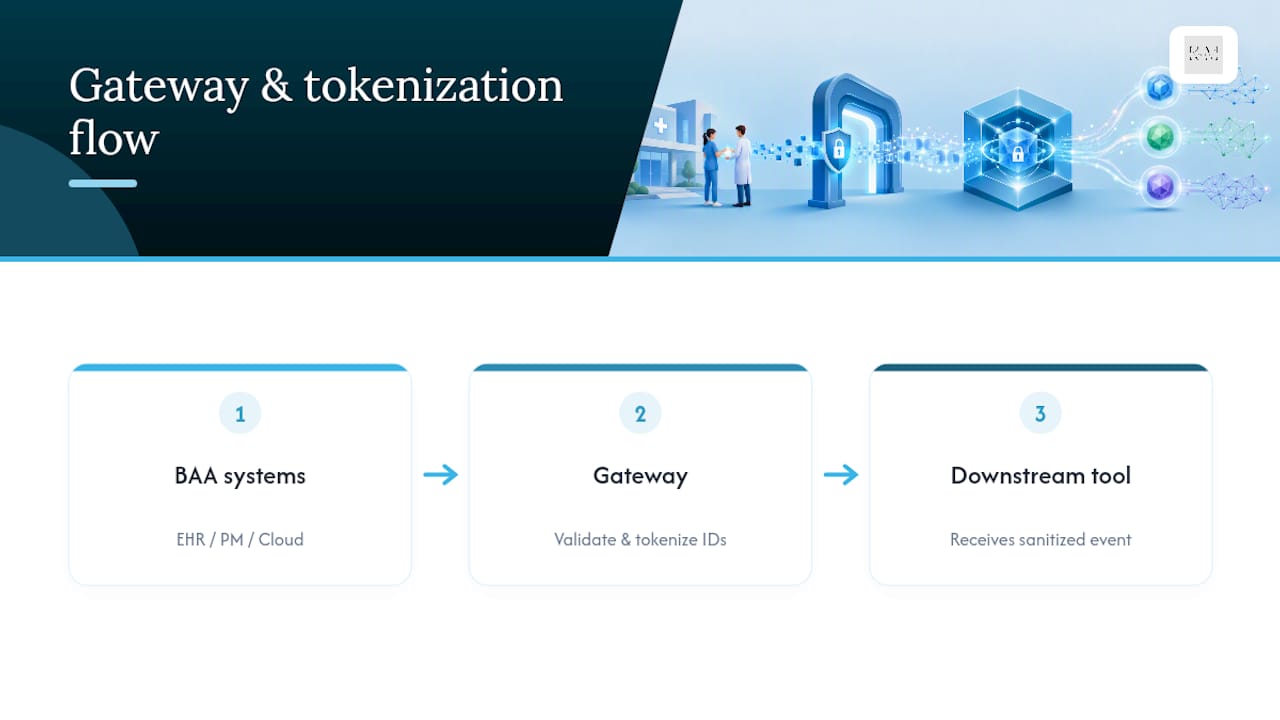
The short version: small clinics usually do best staying inside EHR-native tools, while larger organizations tend to combine a BAA-ready platform with an engineering-controlled gateway.
What to Verify Before You Sign With Any Automation Vendor
A signed BAA is the starting line, not the finish line. Plenty of vendors will hand you a BAA template happily and then bury the details that actually matter. Before you commit budget or engineering time, work through this checklist.
- Confirm subprocessor disclosure. The BAA should name every subprocessor that might touch PHI, because HHS guidance is clear that a BAA without enumerated subprocessors and retention terms isn’t procurement-ready.
- Check data storage geography. Ask exactly where data is stored and processed, especially if the vendor uses international subprocessors.
- Review retention and deletion policies. Get a written answer for how long task logs, attachments, and error records are kept, and whether you can force early deletion.
- Verify technical safeguards match the Security Rule. Look for encryption at rest and in transit, role-based access control, and tamper-evident audit logging, not just marketing language claiming “enterprise-grade security.”
- Request the SOC 2 Type II report itself, not a summary page, and confirm the audit period actually covers the services you’ll be using.
- Ask about breach notification timelines. The BAA should specify how fast the vendor notifies you of an impermissible disclosure, since HHS breach rules put the clock on you the moment you’re aware.
- Get sample retention or erasure proof. A vendor that can’t demonstrate how deletion actually works in their system is telling you something.
Pro Tip: Send the vendor’s compliance contact a two-line email asking “Which subprocessors would touch our PHI, and where is that documented in the BAA?” A vendor that stalls on that question is a red flag no sales deck can fix.
How KLYR Media Builds HIPAA-Compliant Automation for Healthcare Clients
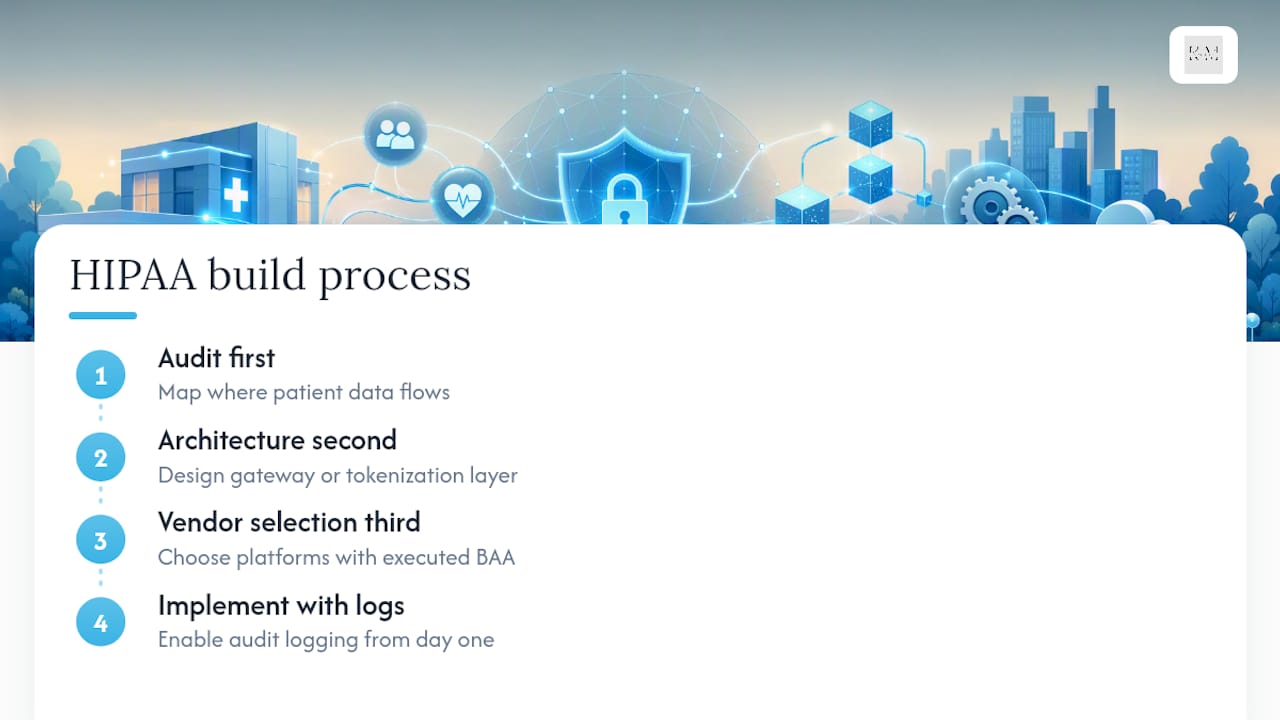
KLYR Media approaches this the same way it approaches any compliance-sensitive build: audit first, architecture second, vendor selection third. We start by mapping exactly where patient data actually flows in a practice’s current systems, then design a gateway or tokenization layer where needed, select automation and marketing platforms that operate under an executed BAA, and implement with audit logging built in from day one rather than bolted on afterward.
That process shows up across our HIPAA-compliant website design, marketing automation configured with BAA-covered vendors, and local SEO work that keeps patient communication channels secure.
The Tradeoff Nobody Wants to Admit
Speed and compliance pull in opposite directions, and pretending otherwise is how PHI ends up somewhere it shouldn’t. If a BAA path isn’t already clear, the disciplined move is to delay the automation, not the compliance. Loop in your compliance and IT staff before you build anything, and pilot new workflows inside BAA-covered systems first. Quick wins on general-purpose tools are fine, but only for data that’s genuinely non-PHI and sanitized on paper you can defend in an audit.
— Opinly
Get a HIPAA Compliance Review for Your Practice’s Automation
Zapier’s stance is clear, and so is the fix: keep PHI inside BAA-covered systems and build the convenience layer around it, not through it. That’s exactly the gap KLYR Media closes for independent pharmacies, clinics, and practices that don’t have an in-house compliance engineering team but still need patient reminders, intake forms, and follow-up sequences running smoothly.

Our team maps your current automation against HIPAA’s requirements, flags anywhere PHI might be leaking through an unvetted connector, and recommends an architecture built on vendors that actually sign a BAA. Services include HIPAA-compliant website design for secure patient intake, and marketing automation implemented on BAA-covered platforms instead of general-purpose tools. A compliance review from KLYR Media gets you a gap analysis, a suggested architecture (including tokenization where it applies), and a vendor checklist you can hand straight to your compliance officer. If your practice needs a concrete starting point, our guide on HIPAA-compliant automation examples walks through real workflow patterns. Reach out to KLYR Media to schedule your compliance review and get a specific plan for your practice’s systems.
Where to Verify the Rules Yourself
For primary sourcing, check HHS on business associate requirements, breach notification timelines, and the Data Privacy Framework for subprocessor checks.
This article is general information, not a substitute for advice from a qualified doctor. Consult a qualified healthcare professional about your own circumstances before acting on anything here.
Sources
- HHS: HIPAA laws and regulations (Business associate requirement)
- Is Zapier HIPAA compliant? — Zapier
- HHS: Security Rule technical safeguards
- Is Zapier HIPAA Compliant? (guide) — HIPAA Vault

