
HIPAA Safe Google Business Posts: 5 Ready Templates for Clinics
HIPAA safe Google Business Posts for clinics: get five ready templates, a posting cadence, a compliance checklist, and an optional managed support service.

HIPAA Safe Google Business Posts: 5 Ready Templates for Clinics

Yes, healthcare practices should be using Google Business Posts, but only with HIPAA-safe templates and Google’s regulated content rules built into the workflow. Done right, posts boost visibility in Search and Maps, drive booking and call clicks, and keep patients informed about seasonal and urgent care needs. The one catch: skip anything touching pharmaceutical products, medical devices, or identifiable patient information, which lands you in policy trouble fast.
TL;DR:
- Posting at least twice a week maximizes visibility and patient engagement, as weekly posts tend to expire before building consistent momentum.
- All posts must avoid mentioning pharmaceuticals, devices, and any patient-specific details to remain compliant with Google’s policies and HIPAA regulations.
- Tracking tools like UTM parameters and patient surveys help attribute new bookings directly to specific Google posts, improving ROI measurement.
- Using ready-made templates for practice updates, events, offers, health education, and reminders simplifies content creation within policy boundaries.
- Managed posting services can ensure compliance and maintain a daily publishing cadence without adding burden to busy office staff.
Table of Contents
- Why do Google Business Posts matter for healthcare practices?
- What should you post? Types and publish-ready templates
- Google’s rules and HIPAA-safe posting practices
- How often should you post, and what should a calendar look like?
- How do you track ROI from Google Business Posts?
- The step-by-step checklist before you hit publish
- KLYR Media’s approach to HIPAA-safe GBP management
- The gap between good advice and what actually gets published
- Get HIPAA-safe posting off your to-do list
- Where these recommendations come from
- Sources
Why do Google Business Posts matter for healthcare practices?
Google ranks local listings on three factors: relevance, distance, and prominence. Prominence is the one you control day to day, and it’s built from profile completeness, review responses, photos, and posting activity. A profile that goes quiet for months signals to Google (and to patients scrolling Maps at 9 p.m. with a sick kid) that nobody’s home.
The stakes are bigger than most administrators assume. A survey cited in healthcare GBP guidance found that 59% of healthcare consumers used online search to find a new primary care provider, and nine in ten said accurate listing information was key to earning their trust. That’s not a marketing nicety, it’s the front door.
Posts influence specific decision moments:
- A patient searching “urgent care near me” at midnight who sees a post about extended weekend hours
- A parent deciding between two pediatric practices who notices one has posted flu shot reminders this month and the other hasn’t posted since spring
- Someone comparing dermatology clinics who clicks “Book Appointment” straight from a post about a new provider joining the practice
Active profiles consistently show more profile views and patient actions than dormant ones. That’s the whole game.
What should you post? Types and publish-ready templates
You don’t need a marketing degree to write a good GBP post. You need a template and five minutes. Here are the five post types that carry the most weight for healthcare practices, each with a ready-to-use example.
- Practice update: “We’ve added Saturday appointments starting this month! Book online or call us to grab a slot.” Pair with a Book CTA and a photo of your front desk or a smiling staff member.
- Event: “Join us for a free skin cancer screening on [date]. Walk-ins welcome, no insurance required.” Pair with Learn More and use the Events post type so it stays live past the standard seven-day window.
- Offer (policy-safe): “New patients get a complimentary consultation this month.” Avoid discount language tied to prescription drugs or devices. Pair with Call Now.
- Health education: “Flu season is here. Here’s who should get vaccinated first and when.” Pair with Learn More linking to a blog post, not a product page.
- FAQ/reminder: “Reminder: annual physicals help catch issues early. Ask us about scheduling yours today.” Pair with Book.
For images, use 1200x900 pixel photos, avoid stock images that look staged, and add descriptive alt text (Google doesn’t index it for posts, but it’s good practice if you reuse the image elsewhere). Keep copy under 1,500 characters, though the first 100 characters are what shows before “read more,” so front-load the point.
Pro Tip: Write your CTA before you write the post. Deciding whether you want a call, a booking, or a click first keeps the copy focused instead of vague and generic.
Google’s rules and HIPAA-safe posting practices
Google’s own Business Profile help documentation is explicit: posts cannot include content about regulated goods and services, which covers pharmaceutical products and medical devices. That means no naming specific prescription medications, no promoting device brands, and no language that reads like an ad for a controlled treatment.
HIPAA adds a second, stricter layer. Posts must never include protected health information, meaning no patient names, no identifiable photos without signed consent, and no details specific enough that a neighbor could guess who’s being described. If you want to feature a patient story, get written consent and strip every identifying detail, or better, use a composite scenario instead of a real case.
Here’s the practical breakdown:
- Do: “We now offer telehealth visits for follow-up care.” Don’t: “Ask your doctor if [Drug Name] is right for you.”
- Do: “Our physical therapy team helped patients return to activity faster this year.” Don’t: “Meet Sarah, who recovered from her knee surgery with us.” (identifiable name and condition)
- Do: General screening reminders and open enrollment updates. Don’t: Any post requiring a clinician’s clinical claim without sign-off.
A useful rule of thumb from industry playbooks: if a post makes a clinical claim, get a clinician to approve it before it goes live. That single step catches most compliance problems before they happen.
How often should you post, and what should a calendar look like?
Standard GBP posts (outside of Events) expire after seven days, which is the single biggest reason cadence matters more in healthcare than in most other industries. A post that vanishes after a week can’t build momentum if you’re only publishing once a month.
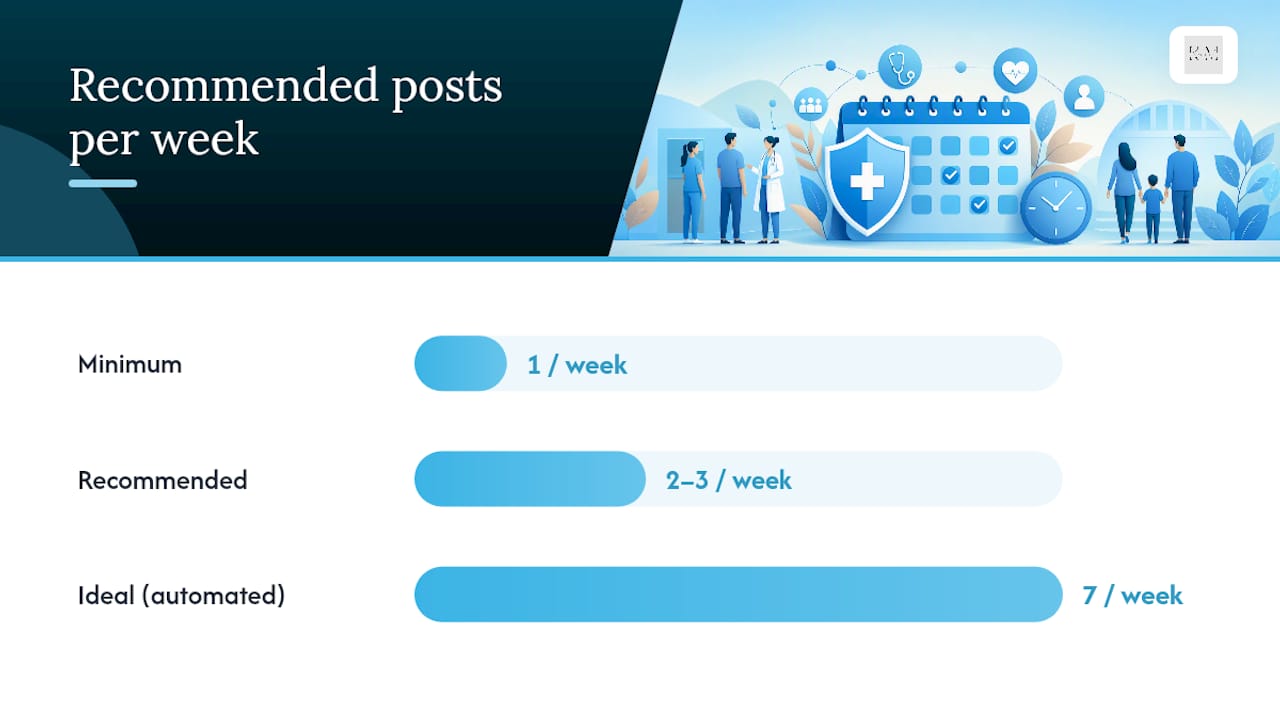
Three cadence tiers work depending on your staffing:
| Cadence | Frequency | Best for |
|---|---|---|
| Minimum | 1 post/week | Solo practices with no dedicated marketing staff |
| Recommended | 2 to 3 posts/week | Practices with a front-desk or office manager handling marketing part-time |
| Ideal (automated) | Daily | Practices using automation tools or a managed service |
Case studies from automation vendors report that daily posting drives measurably higher profile views and patient actions compared with sporadic posting. A simple monthly calendar might pair week one with a health awareness theme (flu shots in October, heart health in February), week two with a practice update, week three with an FAQ, and week four with a local event or community tie-in.
How do you track ROI from Google Business Posts?
Google’s own Insights panel gives you the baseline numbers: profile views, search clicks, CTA clicks (Call, Book, Directions), and direction requests. Check these weekly, not monthly, since a sudden drop usually means a post expired without a replacement queued up.
The gap most practices miss is connecting a post click to an actual booked appointment. Two fixes close that gap:
- Add UTM parameters to every link in a post so Google Analytics can tell you exactly which post drove a landing page visit
- Add a “How did you find us?” field to your intake form or CRM, with “Google post” or “Google search” as explicit options
That second fix is the cheapest attribution tool you’ll ever set up. A quick intake question combined with UTM-tagged links is the lowest-friction way to trace a new patient back to a specific post, without needing a call-tracking platform.
Pro Tip: Review your top three performing posts every month and repost variations of them. If a flu shot reminder got triple the clicks of everything else, that’s your template for next flu season, not a one-time win.
The step-by-step checklist before you hit publish
Run every post through this sequence before it goes live:
- Confirm the staff member posting has proper access permissions on the profile
- Check the copy against Google’s regulated content policy and HIPAA guardrails
- Confirm the CTA matches the post’s goal (Book, Call, or Learn More)
- Verify the image meets size specs and looks authentic, not stocky
- Add UTM tags to any linked URL
- Schedule the post to land when patient search volume peaks (weekday mornings for most practices)
- Log the post title and date in a shared tracker so nothing gets duplicated
Any post referencing a specific treatment, medication, device, or patient outcome needs a clinical or legal read before publishing. That’s a red flag, not a formality.
| Checklist item | Why it matters |
|---|---|
| Access permissions | Prevents unauthorized or off-brand posts |
| Compliance check | Avoids Google policy violations and HIPAA exposure |
| CTA match | Drives the specific action you want |
| UTM tagging | Enables attribution back to bookings |
Hold a fifteen-minute weekly review to look at Insights data and plan the next week’s posts. That habit alone keeps most practices consistent.
KLYR Media’s approach to HIPAA-safe GBP management
Busy front-desk teams already juggle scheduling, insurance calls, and patient intake. Adding a daily posting habit on top of that is where compliance risk creeps in, someone rushes a post and skips the clinical review step. Managed GBP posting removes that pressure by building compliance checks directly into the publishing workflow instead of relying on memory.
Klyrmedia builds HIPAA-compliant websites and marketing automation systems specifically for independent pharmacies and medical practices, which means the same compliance logic that governs a practice’s website also governs its GBP content calendar.
Signals that it’s time to bring in managed support:
- Your last GBP post was more than two weeks ago
- Nobody on staff feels confident reviewing clinical claims for compliance
- You want daily posting cadence but don’t have the staff hours for it
The gap between good advice and what actually gets published
Most GBP guidance treats posting like a content marketing exercise: pick a topic, write something engaging, hit publish. That advice ignores the reality inside a medical office, where the person responsible for GBP is also answering phones, verifying insurance, and rooming patients. The bottleneck isn’t knowing what to post. It’s finding fifteen consistent minutes a week to do it, especially with a compliance check attached.
The conventional wisdom also underweights how fast a seven-day expiration punishes inconsistency. A practice that posts brilliantly once a month is still invisible for three out of every four weeks. Cadence beats cleverness here, and that’s a hard pill for anyone who thinks one perfect post will move the needle.
If you take one thing from this, prioritize the compliance sign-off step before you worry about creative copy. A generic but policy-safe post published weekly will outperform a witty one that never sees daylight because nobody wanted to be the one who approved it.
— Opinly
Get HIPAA-safe posting off your to-do list
Klyrmedia handles Google Business Post management as part of a broader marketing automation package built for independent pharmacies, clinics, and medical practices, so your team never has to choose between compliance and consistency. That means publish-ready templates, clinical sign-off checkpoints, and a posting cadence that doesn’t depend on whoever has a free ten minutes that day.

Services cover marketing automation for scheduling and tracking posts, along with HIPAA-compliant website builds that keep your entire digital presence aligned with the same privacy standards. After you reach out, expect a short audit of your current GBP profile, a proposed posting calendar based on your specialty and patient volume, and a clear timeline for when automated posting goes live. Book a consultation through the marketing automation page and get your first month’s calendar built before your next slow week hits.
Where these recommendations come from
The compliance guidance here draws directly from Google’s own Business Profile policy on regulated goods and services. Cadence and template recommendations come from healthcare-specific GBP playbooks, including Prospelle’s post guide and CareCredit’s optimization insights. Data on posting frequency and profile engagement comes from DearDoc’s local SEO analysis. For broader local ranking context, see Klyrmedia’s guide to local search ranking factors for healthcare providers.
This article is general information, not a substitute for advice from a qualified doctor. Consult a qualified healthcare professional about your own circumstances before acting on anything here.
Sources
- Create & manage posts on your Business Profile - Google Business Profile Help
- Google Business Profile Optimization for Healthcare: Why It Matters
- How To Write Google Posts For Healthcare | Prospelle

