
Google My Business for Clinics: Your 2026 Patient Guide
Discover what Google My Business for clinics is and how it helps attract local patients. Optimize your profile to boost appointment bookings!

Google My Business for Clinics: Your 2026 Patient Guide

Google My Business for clinics, formally known as Google Business Profile, is the free tool that lets medical practices control how they appear in Google Search and Google Maps to attract local patients. 83% of patients start their search for a new healthcare provider on Google. That single fact tells you everything about where your clinic needs to show up. A complete, verified profile puts your practice in front of patients at the exact moment they are ready to book. This guide covers setup, optimization, and the specific features that turn profile views into scheduled appointments.
What is Google My Business for clinics and why does it matter?
Google Business Profile is your clinic’s digital front door on Google. When a patient searches “urgent care near me” or “family doctor in [your city],” Google pulls from verified business profiles to populate the local 3-pack, the three listings that appear above organic search results and beside Google Maps. Profiles in the local 3-pack capture the majority of clicks and calls from those searches. Missing from that box means missing patients who never scroll further.
The profile displays your clinic’s name, address, phone number, hours, services, photos, and patient reviews. Patients use all of that information to decide whether to call you or your competitor down the street. A thin or inaccurate profile signals neglect, and patients notice. A fully built profile signals a practice that is organized, trustworthy, and ready to see them.
For independent clinics competing against large health systems, this tool levels the playing field. You do not need a massive advertising budget to appear alongside hospital networks in local search. You need a complete, optimized profile and a consistent management habit.
How does Google Business Profile help clinics attract local patients?
The benefits of GMB for clinics go well beyond just showing your address. Here is what a fully activated profile actually does for patient acquisition:
- Local 3-pack placement. Your clinic appears above organic results when patients search for nearby providers, capturing clicks before they reach any website.
- Google Maps visibility. Patients searching while driving or walking see your clinic pinned on the map with directions, hours, and a call button.
- Accurate clinic details. Hours, phone number, website, and location are displayed consistently, reducing the friction that causes patients to give up and call someone else.
- Healthcare-specific attributes. Activating attributes like telehealth availability, wheelchair access, and accepted insurance helps patients make decisions before they even visit your website.
- Direct patient actions. Patients can call, get directions, visit your site, or book an appointment without leaving the Google results page.
- Patient reviews. Star ratings and written reviews appear directly on your profile. Positive reviews build trust fast. Responding to reviews signals that your practice is engaged and attentive.
The attributes feature deserves special attention. Most clinic managers fill in the basics and stop there. Patients searching for a provider who accepts Medicaid, offers Saturday hours, or has telehealth options will filter by those attributes. If yours are blank, you are invisible to those searches.
Pro Tip: Add every relevant attribute your clinic offers, even ones that feel obvious. Telehealth, online scheduling, and language support are the three most searched healthcare attributes on Google right now.
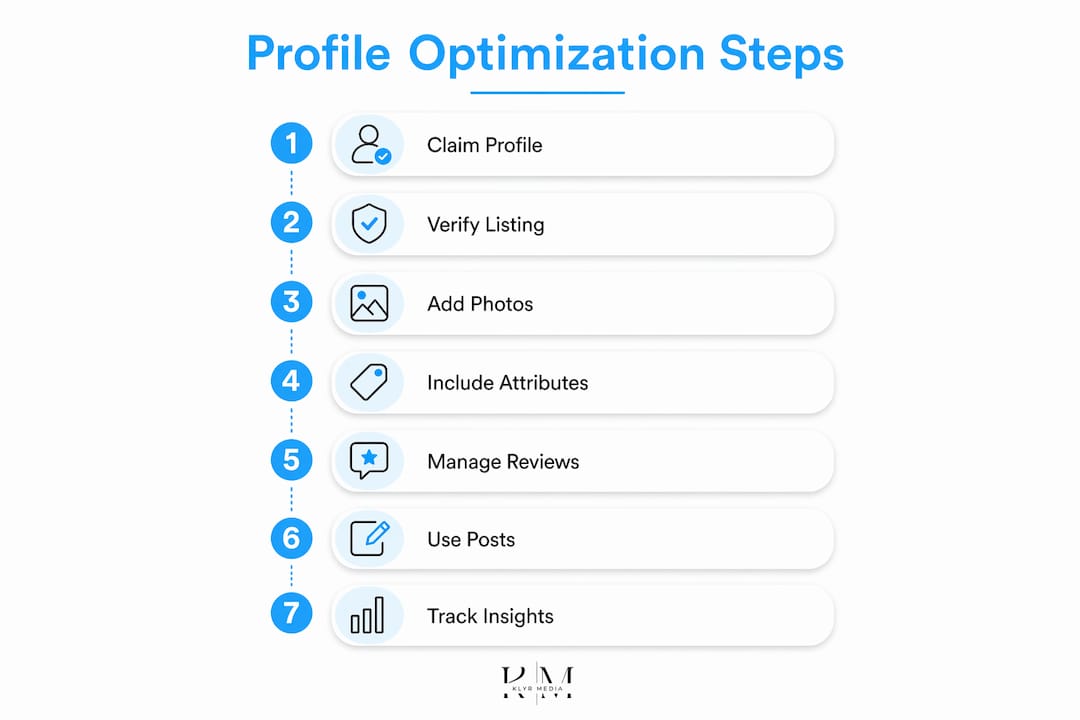
How to set up your clinic’s Google Business Profile
Getting your profile live is a five-step process. Do not skip verification. Claiming and verifying your profile is what gives you control over the listing and makes your clinic eligible to appear in local search results.
- Search for an existing profile. Google auto-generates profiles for businesses using publicly available data. Search your clinic name on Google Maps before creating a new listing. If a profile already exists, claim it rather than creating a duplicate.
- Claim ownership. Visit Google Business Profile Manager and follow the prompts to claim your listing. You will need to confirm you are authorized to manage the business.
- Verify your profile. Google offers verification by postcard, phone, email, or video. Postcard verification takes 5–14 days. Phone or email verification is faster when available. Complete this step. An unverified profile cannot be fully managed and may not rank.
- Select the right healthcare category. Choosing the most specific category signals to Google which patient searches your profile should match. “Family Medicine Physician” outperforms “Doctor” every time. Add secondary categories for any additional specialties your clinic offers.
- Fill out every field. Enter your clinic name exactly as it appears on your signage, your full address, local phone number, website URL, and complete hours including holidays. Add a detailed business description using natural language that describes your services and the patients you serve.
Pro Tip: Avoid keyword stuffing in your business description. Write it the way you would explain your clinic to a new patient in person. Google rewards natural, informative descriptions over ones packed with search terms.
For a deeper walkthrough of each optimization step, Klyrmedia’s guide on Google Business Profile for healthcare covers clinic-specific scenarios in detail.
How to optimize your Google Business Profile to convert more patients
Setup gets you on the map. Optimization gets you chosen. These are the features that separate a profile patients trust from one they scroll past.
Photos and videos
Clinics with photos receive significantly more direction requests and website clicks than those without. Upload exterior shots so patients recognize the building, interior shots of the waiting area and exam rooms, and photos of your staff. Video walkthroughs of the clinic reduce first-visit anxiety, which is a real barrier for new patients.

Google Posts
Google Posts appear directly on your profile and in search results. Use them to announce new services, seasonal health reminders, updated hours, or provider introductions. Posts expire after seven days, so a weekly posting habit keeps your profile active and signals to Google that your business is current.
Online booking integration
Reserve with Google lets patients book appointments directly from your profile without calling the front desk. This integration removes the single biggest friction point in patient acquisition. A patient who can book at 10:00 PM on a Tuesday will. A patient who has to call during business hours often does not.
Review management with HIPAA compliance
Responding to patient reviews builds trust and improves local rankings. The HIPAA compliance piece is non-negotiable. Never confirm that someone is a patient, never reference specific treatments, and never include any protected health information in a public response. A safe response acknowledges the feedback and invites the reviewer to contact the clinic directly.
Profile Insights
Google provides data on how patients find your profile, what actions they take, and which photos get the most views. Check Insights monthly. If direction requests spike after you add a new photo, that tells you something. If calls drop after a hours change, that tells you something too.
For clinics building a broader local presence, pairing your profile with local SEO for healthcare compounds the results significantly.
You can also find a practical breakdown of 2026 profile optimization tactics that apply directly to healthcare practices.
Common mistakes that hurt your clinic’s profile performance
Most clinic profiles underperform not because of what they lack, but because of what they get wrong. These are the pitfalls that cost clinics patients every week.
- Outdated hours. A patient who drives to your clinic based on Google hours and finds it closed will not give you a second chance. Update holiday hours, temporary closures, and schedule changes the day they happen.
- Generic category selection. Listing your practice as “Medical Clinic” instead of “Pediatric Clinic” or “Orthopedic Surgeon” makes you invisible to the patients most likely to book with you. Be specific.
- Ignoring reviews and Q&As. Unanswered negative reviews and ignored patient questions signal that your practice does not care. Both hurt your ranking and your reputation.
- Skipping verification. An unverified profile can be edited by anyone, including patients or competitors. You also lose the ability to respond to reviews or post updates.
- Leaving attributes blank. Patients filter by telehealth, accessibility, and insurance options. A blank attribute field is a missed opportunity to match with a patient who is ready to book.
Clinics that treat their profile as a one-time setup task consistently lose ground to practices that manage it actively. The profile is not a listing. It is a live patient acquisition channel.
Key takeaways
A fully optimized Google Business Profile is the single most cost-effective patient acquisition tool available to independent clinics in 2026.
| Point | Details |
|---|---|
| Verification is non-negotiable | An unverified profile cannot be fully managed and may not appear in local search results. |
| Specific categories drive targeted traffic | Choosing “Family Medicine Physician” over “Doctor” matches your profile to the right patient searches. |
| Attributes filter in ready-to-book patients | Telehealth, accessibility, and insurance attributes help patients self-qualify before they call. |
| Review responses build trust and ranking | HIPAA-compliant responses to reviews signal engagement and improve local SEO performance. |
| Booking integration removes friction | Reserve with Google lets patients book directly from search, capturing appointments that would otherwise be lost. |
What I have learned about clinics and their Google profiles
Clinics that focus only on keywords miss the competitive edge that comes from using every profile feature available. That insight from working in healthcare marketing is not subtle. It is the gap between a profile that ranks and one that converts.
The practices I see winning in local search are not the ones with the biggest ad budgets. They are the ones that treat their Google Business Profile like a front desk employee. They update it regularly, respond to every review, and use Posts to communicate with patients before those patients even visit the website. That consistency compounds over months.
The overlooked feature that surprises most clinic managers is the Q&A section. Patients ask questions directly on your profile, and if you do not answer them, anyone can. Monitoring and answering Q&As proactively, with HIPAA-safe language, builds patient confidence in a way that no ad can replicate. Pair that with a patient acquisition strategy that extends beyond Google, and you have a system that works around the clock.
The clinics that treat profile optimization as a one-time task will keep losing patients to the ones that treat it as an ongoing practice. The good news is that most of your local competitors are still in the one-time-setup camp.
— Opinly
Klyrmedia’s healthcare marketing services for clinic growth
Running a clinic is a full-time job. Managing a Google Business Profile, building a HIPAA-compliant website, and keeping up with patient engagement on top of that is a lot to ask of any clinic team.
Klyrmedia specializes in exactly this. The team builds HIPAA-compliant websites that complement your Google Business Profile and convert visitors into scheduled patients. Klyrmedia also offers marketing automation services that keep patients engaged after they find you on Google, from appointment reminders to follow-up sequences. For independent clinics that want to compete with large health systems without a large marketing team, Klyrmedia provides the infrastructure to do it.
FAQ
What is Google My Business for doctors and clinics?
Google My Business, now called Google Business Profile, is a free tool that lets healthcare providers manage how their practice appears in Google Search and Google Maps. It displays your clinic’s hours, location, services, reviews, and booking options to local patients.
How do I verify my clinic’s Google Business Profile?
Google offers verification by postcard, phone, email, or video. Postcard verification takes 5–14 days. Complete verification is required to manage your profile and appear in local search results.
Why does my clinic need a Google Business Profile?
83% of patients begin their provider search on Google. A verified, optimized profile puts your clinic in the local 3-pack, where most patient clicks and calls originate.
What attributes should a medical clinic add to its profile?
Add every relevant attribute your clinic offers, including telehealth availability, wheelchair accessibility, accepted insurance types, and language support. These attributes help patients filter and choose your practice before they visit your website.
Can patients book appointments through Google Business Profile?
Yes. Reserve with Google integrates online booking directly into your profile. Patients can schedule appointments from the search results page without calling the front desk, which removes a major barrier to new patient conversion.

