
Why Branded Patient Portals Drive Patient Engagement
Discover why branded patient portals drive engagement, retention, and workflow efficiency, making them a smart investment for healthcare providers.

Why Branded Patient Portals Drive Patient Engagement

Branded patient portals are worth the investment. Providers that deploy them see measurably higher engagement, stronger retention, and real workflow gains compared to generic off-the-shelf alternatives. Mobile app users access their health records at nearly twice the rate of web-only portal users (42% vs. 28% accessing records six or more times per year). Industry reports note that branded portals reduce patient churn in specialty care settings. And a systematic review published in JMIR found that patients consistently report positive satisfaction and feasibility with portal-based healthcare management.
The bottom line for your next board meeting: Branded portals outperform generic ones on engagement, retention, and clinical workflow support — and the evidence base is strong enough to justify a scoping investment today.
Table of Contents
- What makes a branded patient portal different from a generic one?
- Core benefits that matter to leadership and finance
- What the research actually shows
- What implementation actually requires
- How to actually get patients to use it
- KPIs and ROI: what to measure and when
- Common pitfalls and how to avoid them
- Build custom or configure an existing EHR portal?
- Key Takeaways
- What the first 90 days actually look like
- Klyrmedia helps you build, launch, and fill your branded portal
What makes a branded patient portal different from a generic one?
A branded patient portal is not just a reskinned third-party tool with your logo dropped on the login page. It is a fully integrated digital environment that carries your clinic’s visual identity (logo, color palette, custom URL or subdomain), maps to your specific clinical workflows, and connects directly to your EHR and communication systems. Patients land on a portal that feels like an extension of your practice, not a vendor’s product.
Generic or off-the-shelf portals, by contrast, ship with fixed templates and vendor-controlled workflows. They get you live faster, but they constrain what you can do.
| Dimension | Branded portal | Generic/off-the-shelf portal |
|---|---|---|
| Visual identity | Custom logo, URL, color scheme | Vendor branding, shared subdomain |
| Workflow control | Configurable to your clinical steps | Fixed vendor templates |
| Data ownership | Provider retains full export rights | Vendor-dependent |
| Integration depth | FHIR/HL7, SSO, EHR-native | Limited API access |
| Time to launch | Longer (weeks to months) | Faster (days to weeks) |
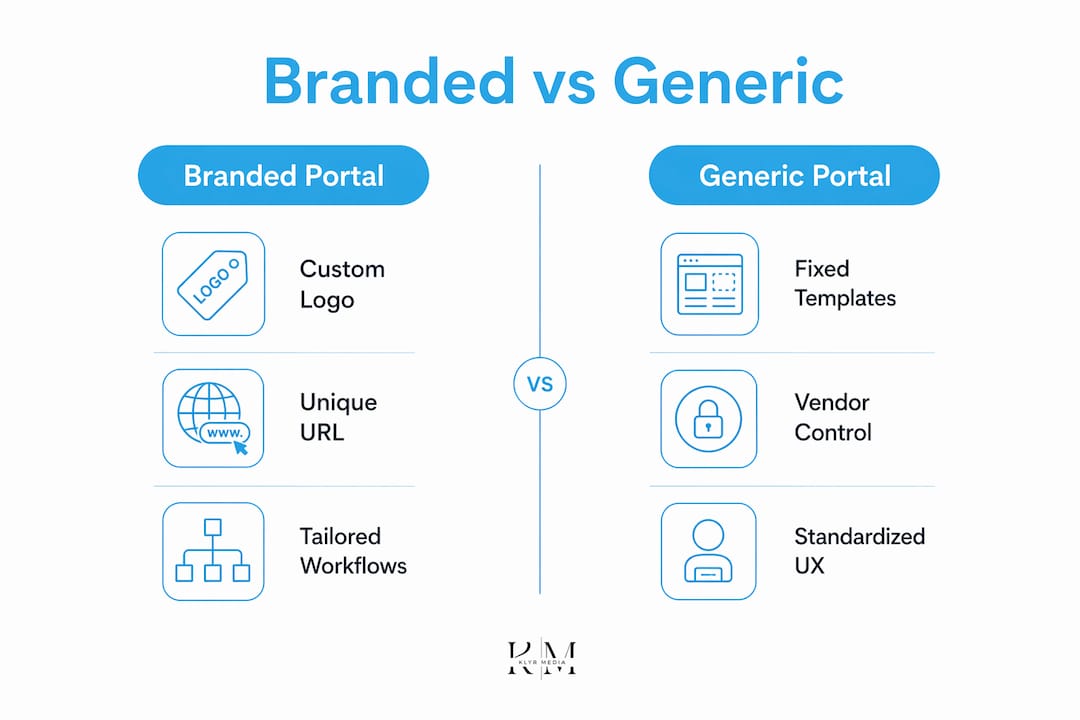
What “branding” actually includes: a custom subdomain (e.g., portal.yourclinic.com), welcome emails that match your clinic’s voice, in-portal messaging that links back to your main site, and clinician-facing workflow alignment so staff aren’t toggling between systems. Consistent visual identity across the portal signals to patients that the tool is yours, not a third-party system they should be suspicious of.
Core benefits that matter to leadership and finance
The case for branded portals comes down to four areas your CFO and CMO will actually care about.
- Patient engagement: Mobile-first portal design broadens access and reduces friction, including among older adults who primarily use smartphones. Higher engagement means more touchpoints, better adherence tracking, and fewer gaps in care.
- Retention and churn reduction: Branded portals create consistent clinical touchpoints that keep patients visible to your practice between visits, which is especially valuable in specialty care where churn is expensive.
- Trust and brand continuity: Patients who recognize your logo and URL on the portal are less likely to abandon enrollment mid-flow. Disjointed, generic tools undermine confidence; a portal that looks and feels like your practice reinforces it.
- Workflow automation and lower admin load: Custom portals support complex multi-step workflows — automated appointment reminders, e-consents, pre-op testing checklists, prescription refill requests — that reduce phone volume and staff time per patient.
Stat for your deck: Mobile app users access health records at 42% (six or more times per year) vs. 28% for web-only users, per ONC-cited research.
Pro Tip: When pitching to leadership, frame the ROI around three numbers: no-show reduction, staff time saved per week, and 12-month patient retention rate. Finance responds to those faster than engagement metrics alone.
What the research actually shows
The evidence base is solid on satisfaction and feasibility. It is more cautious on hard clinical outcomes.
“eHealth tools like patient portals engage and empower patients, especially those with chronic conditions — with most studied patients reporting positive satisfaction, acceptability, and feasibility.” — JMIR Systematic Review, 2022
Key findings worth citing:
- About 90% of U.S. health systems offer portals, but only 15%–30% of patients actively use portal features. Availability alone does not drive adoption.
- A systematic review across 47 studies found positive results for health status monitoring, patient-doctor interaction, and quality of care, with generally favorable patient attitudes.
- The same review flagged privacy concerns and limited digital literacy as the top barriers, not portal quality itself.
The honest limitation: evidence on whether portals improve hard clinical outcomes (hospitalizations, ED visits) is still mixed. Where portals show the clearest benefit is in chronic disease management, medication adherence, and patient-provider communication. That is where your implementation strategy should focus first.
What implementation actually requires
Scoping this correctly before you talk to vendors will save you months of rework.
- EHR integration: Confirm your EHR supports FHIR R4 or HL7 v2 APIs. SMART on FHIR enables single sign-on so patients use one credential across systems.
- Identity and access management: Define role-based access for patients, clinicians, and admin staff before configuring the portal.
- HIPAA compliance baseline: Encryption in transit (TLS 1.2+) and at rest, signed Business Associate Agreements with every vendor touching PHI, and audit logs for all data access events.
- Hosting and uptime: Confirm SLA terms (99.9% uptime is a reasonable floor) and where PHI is stored (U.S.-based servers only).
- Workflow mapping: Document every patient-facing workflow the portal must support before any vendor demo.
Vendor evaluation checklist:
- Does the vendor own the roadmap, or are you dependent on a third-party component they resell?
- What are the API access limits and customization constraints?
- What are the data export terms if you switch vendors?
- What recurring fees apply as your patient volume grows?
Pro Tip: Map your top five clinical workflows on paper before any vendor conversation. If a vendor can’t walk through your pre-op consent flow or your chronic disease recall process step by step, you’re looking at a reskin, not a real solution. Klyrmedia’s HIPAA-compliant web design process starts exactly here.
How to actually get patients to use it
Low uptake is the single biggest reason portal projects fail. The strongest predictor of higher portal use is in-person, staff-led training and multifaceted engagement campaigns — not the software itself.
- Define your pilot cohort: Start with one condition group (e.g., diabetes or hypertension patients) where portal value is clearest.
- Train staff before launch: Every front-desk and clinical staff member needs a 15-minute enrollment script and answers to the five most common patient objections.
- Enroll at check-in: The highest-converting enrollment moment is in-person, at the point of care. Hand the patient a device and walk them through registration before they leave.
- Multi-channel follow-up: Send an SMS the same day, an email within 48 hours, and a phone call at 7 days for patients who haven’t activated.
- Phased feature release: Launch with scheduling and messaging first. Add lab results, e-consents, and billing after the first 30 days.
Sample staff talking point: “We have a secure patient portal where you can message us, see your results, and book your next visit without calling. Can I help you set it up before you leave today?”
Watch these metrics in the first 60 days: activation rate, login frequency, and message response time from staff.

KPIs and ROI: what to measure and when
| Metric | Definition | Target window |
|---|---|---|
| Activation rate | % of invited patients who complete registration | 30 days post-invite |
| Weekly active users | Unique logins per week / total activated patients | 60–90 days |
| Message response time | Avg. hours from patient message to staff reply | Ongoing; target under one day |
| No-show rate | % of scheduled appointments missed | 90 days |
| 12-month retention | % of patients with at least one visit in 12 months | 12 months |
Simple ROI model:
- Estimate current no-show rate and average revenue per appointment.
- Apply a conservative 10–15% no-show reduction from automated reminders.
- Add staff time saved per week (fewer phone calls, fewer manual reminders) multiplied by hourly cost.
- Subtract annual portal licensing and implementation costs.
Most practices see measurable movement in no-show rates and message volume within 3–6 months. Retention metrics take 9–12 months to show clearly. Patient retention automation tools can accelerate that timeline by embedding recall logic directly into the portal workflow.
Common pitfalls and how to avoid them
- Low uptake: The most common failure mode. Mitigate with staff-led enrollment, not passive email invites.
- Vendor lock-in: Negotiate data export rights and API access in writing before signing. If you can’t export your patient data in a standard format, walk away.
- Security lapses: Every vendor touching PHI needs a signed BAA. Audit logs must be enabled from day one, not added later.
- Fragmented patient experience: If your portal welcome email looks nothing like your clinic’s website, patients disengage. Branding must persist across every touchpoint.
- Poor mobile UX: Progressive Web Apps (PWAs) and mobile-first interfaces reduce registration friction and improve adoption, especially among older adults.
Risk stat to share: Only 15%–30% of patients at health systems that already offer portals actively use them. The gap between availability and adoption is where most projects lose their ROI.
Build custom or configure an existing EHR portal?
Neither path is universally right. The decision turns on your workflows, budget, and tolerance for vendor dependency.
- Build custom: Full control, full ownership, highest TCO upfront. Right for organizations with complex multi-step workflows that off-the-shelf tools can’t replicate.
- Configure EHR-native portal: Faster to launch, lower upfront cost, but constrained by the vendor’s roadmap and customization limits.
- Hybrid approach: Use a pre-built component library (scheduling, messaging, lab results) and customize the UX layer and workflow logic on top. Often the best balance of speed and control.
Decision checklist before your board meeting:
- Which clinical workflows must the portal support from day one?
- Do you need to own the patient data stack, or is vendor-hosted acceptable?
- What is your 3-year budget for licensing, maintenance, and iteration?
- What is your acceptable time-to-launch?
- What are your interoperability requirements with referral partners or payers?
If your answer to question 1 includes pre-op consent flows, chronic disease recall, or multi-provider coordination, a generic EHR portal will likely disappoint you within 18 months.
Key Takeaways
Branded patient portals deliver measurable gains in engagement, retention, and workflow efficiency when paired with a structured adoption strategy and proper HIPAA-compliant implementation.
| Point | Details |
|---|---|
| Mobile access drives engagement | Mobile app users access records at 42% vs. 28% for web-only users; design mobile-first from day one. |
| Adoption requires staff, not just software | In-person, staff-led enrollment is the strongest predictor of higher portal use — passive invites don’t work. |
| Low uptake is the primary risk | Only 15%–30% of patients at health systems offering portals actively use them; plan your adoption campaign before launch. |
| ROI is measurable within 3–12 months | No-show reduction and staff time saved are the fastest-moving metrics; retention takes 9–12 months to confirm. |
| Klyrmedia supports end-to-end implementation | From HIPAA-compliant design and EHR integration to adoption campaigns and retention automation, Klyrmedia builds the full system. |
What the first 90 days actually look like
At Klyrmedia, we work with clinics and independent practices that have often already tried a generic portal and hit the same wall: low activation, staff frustration, and a tool that doesn’t match how the practice actually runs. The first 90 days are where the real work happens, and it’s mostly not technical.
Starter checklist for your team:
- Week 1–2: Conduct a scoping interview with clinical and admin leads. Document the top five patient-facing workflows the portal must support.
- Week 3–4: Define your pilot cohort (one condition group, one location). Capture baseline KPIs: current no-show rate, call volume per day, and staff time on manual reminders.
- Week 5–8: Configure and test the portal with a small internal group. Validate that branding persists across welcome emails, in-portal flows, and clinical summaries.
- Week 9–12: Soft-launch with the pilot cohort. Run daily activation tracking. Brief staff weekly on what’s working and what’s not.
The practices that see results fastest are the ones that treat the portal as a clinical program, not an IT project. That mindset shift is the real unlock.
Klyrmedia helps you build, launch, and fill your branded portal
If you’ve read this far, you already know the case for a branded portal is solid. The harder question is execution: HIPAA compliance, EHR integration, staff training, and an adoption campaign that actually moves the activation needle.

Klyrmedia is built for exactly this. As a healthcare-focused digital agency serving clinics and independent practices across the United States, Klyrmedia handles the full stack: HIPAA-compliant portal design, interoperability architecture, branded patient communication, and the adoption campaigns that turn a launched portal into a used one. No generic playbooks. No hand-offs to a vendor you’ve never met.
The engagement model is straightforward: a discovery call to scope your workflows, a pilot build with your highest-value patient cohort, and a phased rollout with staff training baked in. Ready to move from decision to scoping? Book a discovery call with Klyrmedia and get a clear picture of what your branded portal can look like in 90 days.
This article is general informational guidance, not legal or compliance advice. Confirm current HIPAA requirements and applicable regulations with a qualified healthcare compliance professional for your specific situation.

