
Urgent Care SEO: The Local Playbook That Actually Fills Slots
Unlock the secrets of urgent care SEO to attract more patients. Master local search tactics that significantly boost your bookings today!

Urgent Care SEO: The Local Playbook That Actually Fills Slots
Dominating urgent care local search comes down to four levers: Google Business Profile control, review velocity, clinician-attributed symptom pages, and technical fixes that don’t sabotage your booking flow. Patients searching “urgent care near me” decide in seconds, not days, and proximity, accurate hours, and review volume drive that decision more than anything on your homepage. Urgent care SEO isn’t the same game as SEO for a specialty practice with a six-week booking cycle. It’s closer to restaurant SEO with a medical liability layer bolted on.
Here’s what to do in the next hour, before you read another paragraph:
- Claim and verify your Google Business Profile if you haven’t, and confirm your name, address, and phone number match your website exactly.
- Update today’s hours and flag any holiday closures for the next 30 days.
- Add your online check-in or booking link to the GBP “appointment link” field.
- Send one HIPAA-safe review request to a patient discharged in the last 48 hours.
- Screenshot your current map-pack position for “[your city] urgent care” so you have a baseline.
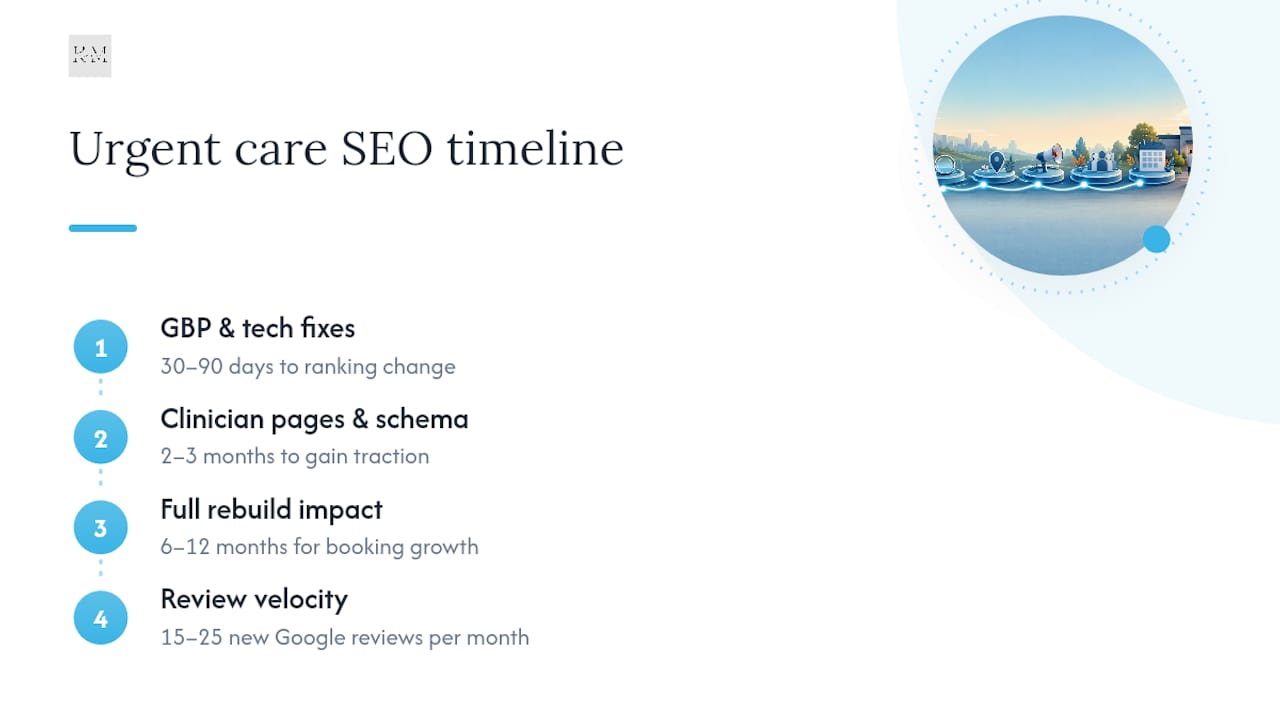
Expect GBP and citation fixes to move the needle within 2 to 4 weeks. Clinician-attributed content and schema markup take 2 to 3 months to show up in symptom-query rankings. Real appointment volume growth from the full build usually lands in the 6 to 12 month range.
Key Takeaways
Urgent care SEO succeeds when clinics build GBP dominance, clinician-attributed schema, and HIPAA-safe review velocity in that order, not as scattered tactics.
| Point | Details |
|---|---|
| GBP is the priority | Claim, verify, and maintain your Google Business Profile weekly; it drives the fastest visible ranking gains. |
| Schema before scale | Build Physician and MedicalCondition schema with clinician sign-off before publishing symptom pages. |
| Reviews need velocity | Automate HIPAA-safe review requests within hours of discharge to sustain 15 to 25 monthly reviews. |
| Timelines are tiered | Expect GBP wins in weeks, schema and content wins in 2 to 3 months, booking growth in 6 to 12 months. |
| Klyrmedia builds the full stack | Klyrmedia maps GBP audits, clinician schema, and automated review programs into one 90-day rollout. |
Table of Contents
- Why Urgent Care SEO Starts With Your Google Maps Listing
- What Does E-E-A-T Mean for Urgent Care Content?
- How Should Urgent Care Clinics Structure Symptom and Service Pages?
- Does Site Speed Actually Affect Urgent Care Bookings?
- How Many Reviews Does an Urgent Care Clinic Need Each Month?
- What Timeline and Budget Should Urgent Care Clinics Expect?
- How a Healthcare-Focused Agency Executes This Build
- Do Social Media and Review Sites Affect Local Rankings Too?
- How Should Urgent Care Clinics Pair Paid Ads With SEO?
- What Should Urgent Care Clinics Track to Measure SEO Performance?
- How Klyrmedia Executes the Urgent Care SEO Playbook
- Frequently Asked Questions
- Sources
Why Urgent Care SEO Starts With Your Google Maps Listing
Your Google Business Profile isn’t a listing. It’s a second homepage, and for most urgent care searches, it’s the only homepage a patient sees before deciding where to walk in. GBP optimization, covering categories, hours, photos, and booking links, is the single highest-leverage local action available to an urgent care clinic, and it costs nothing but attention.
Start with category selection. “Urgent Care Center” should be your primary category every time, not “Medical Clinic” or “Walk-in Clinic Center,” which dilutes your relevance signal. Add secondary categories like “X-Ray Lab” or “Occupational Health Service” only if you actually offer those services on-site.
Here’s the sequence that works:
- Lock the primary category. Verify it says “Urgent Care Center” and hasn’t drifted to something generic.
- Audit hours weekly. Holiday hours, early closures, and extended flu-season hours all need same-day updates. A wrong “closed” listing during business hours is one of the fastest ways to lose a walk-in.
- Publish wait-time updates when your platform supports it. Even a rough estimate posted via GBP updates beats silence.
- Add the booking link. Whether it’s online check-in or a virtual queue, that link belongs in the appointment field, not buried on your website.
- List accepted insurance where the platform permits it. This filters out mismatched calls before they happen.
- Run a 30-day GBP hygiene sprint. Refresh your photo set (exterior, waiting room, exam rooms, staff), moderate the Q&A tab for outdated answers, respond to every review within 48 hours, and search your business name to catch duplicate listings competing against your real one.
Pro Tip: Duplicate GBP listings are the silent killer of map-pack rank. Search “[your clinic name] [city]” in an incognito window quarterly. If you see two pins, request a merge through Google’s support flow immediately, because split review counts and split citations both dilute your ranking signal.
For a deeper walkthrough of field-by-field GBP setup, Klyrmedia’s guide on optimizing Google Business Profile for healthcare clinics covers the specifics your front-desk team can execute without a developer.
What Does E-E-A-T Mean for Urgent Care Content?
Urgent care content falls squarely into what Google calls Your Money or Your Life content, meaning symptom pages, treatment descriptions, and “should I go to the ER” guidance get held to a higher trust bar than a blog about running shoes. Google requires elevated experience, expertise, authoritativeness, and trust signals for medical content, which in practice means your medical director’s name and credentials need to sit visibly on the page, not buried in an “About Us” footer link.
E-E-A-T isn’t a trust badge you slap on. It’s an architecture you build before you scale content, and clinics that treat it that way are the ones ranking on symptom-class searches instead of getting outranked by WebMD.
The schema checklist looks like this:
- MedicalBusiness schema on your homepage and location pages, establishing your clinic as a recognized medical entity type.
- Physician schema attached to any clinician credited with reviewing or writing clinical content, including their name, credentials, and NPI number.
- MedicalCondition schema on symptom and condition pages, structured to describe the condition Google is already indexing elsewhere.
- FAQPage schema on every page answering patient questions in a structured Q&A format.
- sameAs links connecting your Physician schema to that clinician’s NPI registry entry and state medical board listing, which gives Google an external trust anchor it can verify independently.
Operationally, this means every symptom or treatment page needs a named clinician’s sign-off before publishing, with a documented review date and a visible “Reviewed by” byline. Google Search Essentials confirms that structured medical schema helps search systems understand and surface clinical content correctly, and skipping this step is one of the most common reasons well-written urgent care pages never rank. Keep a simple internal log: clinician name, credential, review date, and page URL. Google’s quality raters and any future audit will want exactly that trail.
How Should Urgent Care Clinics Structure Symptom and Service Pages?
Patients search urgent care in two distinct modes: the immediate “urgent care near me open now” query and the slower “should I go to urgent care for a sprained ankle” research query. Most clinic websites only build for the first mode and leave the second one, which often has less competition and higher intent once the patient decides, entirely uncontested.
Identify symptom-class queries worth targeting by looking at your own visit logs. If flu symptoms, minor lacerations, sprains, UTIs, and ear infections make up the bulk of your walk-ins, those are your first five pages, each modified for the specific neighborhoods or ZIP codes you serve rather than duplicated across locations with only the city name swapped.
Build each page with the same anatomy:
- Symptom description in plain language, written the way a worried patient actually types it into Google.
- Red flags that mean the patient should skip urgent care and go straight to the emergency room, since urgent care patient decisions happen fast and accurate triage guidance is a trust signal, not just a legal safeguard.
- Urgent care vs. ER guidance stated explicitly, because this is the exact query pattern patients search when they’re unsure.
- Treatments offered on-site, named specifically rather than described vaguely as “comprehensive care.”
- The clinician who treats it, linked to their Physician schema profile and credentials.
- A clear call to action: check in online, call, or get directions, placed above the fold.
Layer FAQPage schema onto every one of these pages using the actual questions patients ask at check-in. Short, structured answers to specific questions are exactly what AI-powered search surfaces favor when generating direct responses, so a well-marked-up FAQ section does double duty: SERP snippet eligibility today, AI citation eligibility as conversational search keeps growing.
Does Site Speed Actually Affect Urgent Care Bookings?
Yes, and the effect is more direct here than in almost any other healthcare vertical, because a patient deciding between three nearby clinics will bail on a slow site before they even see your hours. A patient in pain isn’t going to wait five seconds for your homepage to load; they’ll hit the back button and call the clinic down the street instead.
Speed fixes that matter most for urgent care sites:
- Compress and lazy-load images, especially the hero photos of your waiting room and exterior.
- Defer non-critical scripts (chat widgets, marketing pixels) so they load after the booking button is interactive.
- Keep your Core Web Vitals scores in the “good” range, particularly Largest Contentful Paint, since healthcare SEO guidance places page speed and mobile UX alongside secure forms as core 2026 ranking requirements.
- Put your phone number in a tap-to-call button in the header, not just the footer.
- Strip booking forms down to name, phone, and reason for visit; every extra field before check-in is a drop-off point.
- Route any form transmitting patient information through encrypted, HIPAA-compliant infrastructure, not a generic contact-form plugin.
Pro Tip: Run your booking page through PageSpeed Insights on mobile specifically, not desktop. Most urgent care traffic is a patient standing in their kitchen holding a phone, and mobile scores are the ones that actually correlate with bookings.
Crawlability matters too. Make sure your patient-facing symptom and service pages are indexable, while backend scheduling systems, admin logins, and duplicate staging pages stay blocked via robots.txt. A cluttered index with thin duplicate pages dilutes the authority your real content is trying to build.
For a full technical audit framework, Klyrmedia’s guide on website optimization for healthcare patient experience breaks down the booking-flow specifics that most generic SEO checklists skip entirely.
How Many Reviews Does an Urgent Care Clinic Need Each Month?
Review velocity, meaning the steady rate of new reviews rather than a one-time total, is one of the strongest local ranking signals urgent care clinics have, because clinics with systematic review programs and transparent wait-time signals consistently outperform competitors in map-pack placement. A clinic that got 40 reviews two years ago and none since looks stagnant to Google’s algorithm, even with a strong star average.
Build the request cadence like this:
- Trigger an automated text or email within 2 to 4 hours of discharge, while the visit is still fresh.
- Send patients to Google first, since it carries the most local ranking weight, with Healthgrades and Yelp as a secondary rotation for patients who’ve already reviewed you on Google.
- Keep the message compliant: request feedback about the experience (wait time, staff, facility) without referencing diagnosis, treatment, or any protected health information.
- Automate the follow-up sequence through a HIPAA-aware platform rather than a generic marketing tool that wasn’t built to handle patient contact data.
For negative reviews, respond within 48 hours with a template that acknowledges the experience without confirming the person was ever a patient. Something like: “We’re sorry to hear about your experience. Please call our office directly so we can address this,” keeps you compliant while showing prospective patients you’re responsive.
Busy clinics running a consistent, HIPAA-compliant automated workflow can realistically generate 15 to 25 new reviews per month, which is the range that keeps velocity visible to Google’s local algorithm.
What Timeline and Budget Should Urgent Care Clinics Expect?
Set expectations in three tiers. Short-term KPIs, tracked weekly, are GBP profile clicks, direction requests, and call volume. Medium-term KPIs, tracked monthly, are symptom-page organic sessions and FAQ snippet appearances. Long-term KPIs, tracked quarterly, are actual booked appointments attributed to organic and local search.
Timelines follow a predictable curve. GBP and technical fixes tend to show early movement within 30 to 90 days, while structural E-E-A-T rebuilds compound over 6 to 12 months before producing material appointment growth. Clinics that expect month-one appointment spikes from a schema build are setting themselves up for disappointment.
Pricing bands vary by scope, but transparent agencies structure it roughly as:
- Foundational tier: GBP setup, NAP citation cleanup, and basic technical fixes.
- Growth tier: adds clinician-reviewed symptom pages, full schema engineering, and a review automation program.
- Full-scale tier: adds ongoing content cadence, competitor gap analysis, and paid media alignment.
Build a simple ROI tracker by tagging your booking form or check-in link with UTM parameters tied to organic and local traffic sources, then cross-reference monthly bookings against GBP insights data. It doesn’t need to be complicated to be useful.
How a Healthcare-Focused Agency Executes This Build
Order matters more than most clinics realize. Rolling out E-E-A-T architecture and clinician schema before symptom pages and GBP campaigns produces a stronger ranking lift than doing it in reverse, because Google needs the trust signals in place before it rewards the content built on top of them.
A specialized workflow typically runs:
- Audit existing GBP, citations, schema, and technical health against the checklist above.
- Build clinician attribution first: Physician schema, sameAs links to NPI and state board records, documented review workflows.
- Roll out symptom-class pages once the trust architecture is verifiable by Google’s systems.
- Layer in the GBP and review program to capture the local demand those pages start attracting.
- Optimize technical performance continuously, since speed and Core Web Vitals scores shift as content volume grows.
A clinic’s website can have flawless copy and still fail to rank if the underlying schema, HIPAA-compliant infrastructure, and clinician documentation aren’t verifiable by Google’s systems. The architecture has to come before the content scales, not after.
Production requires HIPAA-compliant hosting and forms, business associate agreements with every tool touching patient data, and a documented clinician sign-off process for every clinical claim published.
Do Social Media and Review Sites Affect Local Rankings Too?
Search and social aren’t separate channels for urgent care marketing anymore. Google increasingly pulls signals from how active and consistent a business looks across the web, and a clinic with a stale Facebook page from 2023 sends a mismatched trust signal compared to its otherwise polished GBP listing.
Post wait-time updates, seasonal illness alerts (flu season, back-to-school physicals, allergy spikes), and staff introductions on Facebook and Instagram at least weekly. This content does double duty: it engages your existing patient base and it gives you fresh material to link back to your symptom pages, which reinforces topical relevance.
Reputation management extends beyond responding to reviews. Monitor mentions across Nextdoor, local Facebook community groups, and neighborhood forums where patients ask “which urgent care is fastest right now.” These threads often outrank your own website for hyper-local queries, so a staff member (never a bot account) engaging helpfully in these spaces builds real goodwill and occasional referral traffic.
Keep your social profiles’ NAP details, hours, and booking links synchronized with your GBP listing. A mismatch between your Instagram bio hours and your actual GBP hours creates the same trust erosion as inconsistent citations, just in a channel Google is increasingly weighing alongside traditional local signals. Assign one person ownership of this consistency check monthly. It takes fifteen minutes and prevents the slow credibility bleed that comes from platforms quietly drifting out of sync.
How Should Urgent Care Clinics Pair Paid Ads With SEO?
Paid and organic aren’t competing budgets. They’re solving different time horizons, and treating them as one coordinated system beats running them in silos.
Google Local Services Ads and standard Search campaigns should target the exact “near me” and urgent-care-plus-symptom queries your organic symptom pages are also built for, because paid placements dominate the top of results for high-intent, time-sensitive searches your organic rankings might take months to reach. Bid on your highest-volume symptom terms (sprains, flu, minor cuts) in paid while your organic content matures underneath them, then pull back paid spend on terms once organic rank stabilizes in positions one through three.
Retarget website visitors who viewed a symptom page but didn’t book, using display or social ads that reinforce the same clinician-attributed content they already read. This keeps your paid spend efficient instead of chasing cold audiences.
Coordinate landing pages tightly: never send a paid click to your homepage when a dedicated symptom or service page converts at a noticeably higher rate. And make sure your ad extensions, call buttons, and location extensions match your GBP data exactly, since a mismatch between what the ad promises and what the landing page or GBP profile shows creates the kind of friction that tanks quality scores and patient trust simultaneously.
Budget paid spend heaviest around flu season, allergy season, and back-to-school physicals, the predictable demand spikes where organic alone can’t move fast enough to capture the surge.
What Should Urgent Care Clinics Track to Measure SEO Performance?
You can’t manage what you don’t measure, and urgent care clinics need a tracking setup built around the metrics that actually predict walk-ins, not vanity traffic numbers.
Set up Google Business Profile Insights tracking for direction requests, phone calls, and website clicks broken out weekly. These three numbers, tracked over time, tell you whether your GBP hygiene work is translating into real patient action. Pair that with Google Search Console to monitor which symptom and service pages are earning impressions and clicks for the queries you’re targeting, and watch for FAQ-schema pages picking up featured snippet or AI-answer visibility.
On the website side, Google Analytics 4 (or your platform’s equivalent) should be configured with conversion events for every meaningful action: booking form submissions, click-to-call taps, and online check-in completions, each tagged separately so you know which channel and which page drove the action. Call tracking software layered on top lets you attribute phone bookings back to specific campaigns or organic landing pages, which is often where urgent care clinics lose the most attribution clarity.
Review your dashboard monthly, not daily. Local SEO moves in weeks, not hours, and daily obsession over ranking fluctuations wastes time better spent fixing the fundamentals: GBP accuracy, review response speed, and page load time on mobile.
DIY or agency: how to decide who runs your urgent care SEO
DIY works when you have a staff member who can commit real weekly hours to GBP hygiene, review responses, and basic content updates, and when your ambitions stop at foundational local visibility. It falls apart the moment you need clinician-reviewed schema, sameAs verification, or symptom pages built to survive an E-E-A-T audit, because that requires both medical and technical fluency most front-office teams don’t have time to develop.
An agency earns its cost when you need scale across multiple locations, clinician documentation managed consistently, or technical schema builds done right the first time. If your team runs SEO internally, put one person in charge of the GBP calendar and one clinician in charge of content sign-off, with a shared log both can audit monthly.
— Opinly
How Klyrmedia Executes the Urgent Care SEO Playbook
Every action in this article maps directly to a Klyrmedia deliverable. GBP audits and hygiene programs, clinician schema builds with Physician and MedicalCondition markup, symptom-page content with documented clinical review, and HIPAA-compliant infrastructure across the whole build, all handled without your team learning schema markup from scratch.
The first 90 days typically follow the order this article recommends: audit and citation cleanup in weeks one and two, clinician attribution and schema architecture through week six, then symptom-class page rollout and GBP/review program activation running in parallel through day 90. That sequencing matters, because building content before the trust architecture is in place is the single most common mistake clinics make on their own.
Klyrmedia’s HIPAA-compliant website design service handles the technical and compliance foundation, while the marketing automation platform runs the review request cadence and patient follow-up sequences without your staff manually texting every discharged patient. If your clinic is ready for a structured audit instead of another generic SEO checklist, that’s the conversation worth starting this week.
Frequently Asked Questions
What makes urgent care SEO different from general local SEO? Urgent care SEO carries YMYL requirements that generic local businesses don’t face. Clinical claims need clinician attribution, medical schema, and documented review workflows on top of the standard local ranking factors like GBP accuracy and citation consistency.
How long does urgent care SEO take to show results? GBP and technical fixes often move rankings within 30 to 90 days. Clinician-attributed symptom pages and schema builds typically take 2 to 3 months to gain traction, with material booking growth from the full rebuild landing in the 6 to 12 month range.
Do urgent care clinics need Physician schema on every page? Physician schema belongs on any page carrying a clinical claim, symptom description, or treatment recommendation, tied to the clinician who reviewed that content. General informational pages like hours or insurance don’t require it.
How many Google reviews should an urgent care clinic aim for monthly? A busy clinic running a consistent, HIPAA-compliant automated request workflow can generate 15 to 25 new reviews per month, a range that keeps review velocity visible to Google’s local ranking systems.
Should urgent care clinics run paid ads alongside SEO? Yes. Paid search and Local Services Ads capture immediate high-intent demand while organic symptom pages and GBP rankings mature, and coordinating landing pages between the two improves both conversion rate and quality score.
This article is general information, not a substitute for advice from a qualified doctor. Consult a qualified healthcare professional about your own circumstances before acting on anything here.
Sources
For technical implementation, review Google Search Essentials and Google’s SEO best practices guidance on E-E-A-T. Clinics building GBP hygiene in-house can start with Klyrmedia’s step-by-step local SEO guide and healthcare SEO overview.

