
U.S. Pharmacy Google Ads: 5 Step Compliance Checklist
This practical U.S. guide to Google Ads pharmacy rules delivers a five step pre launch compliance checklist, certification steps, landing page musts, and...

U.S. Pharmacy Google Ads: 5 Step Compliance Checklist

Yes, pharmacy-related ads are allowed on Google Ads in the United States, but only within a narrow, certified lane. The single most important compliance step is identifying your correct certification category (online pharmacy, telemedicine, or manufacturer) and securing any required third-party accreditation before you spend a dollar on prescription-related keywords. Until that certification clears, pause any campaign targeting restricted drug terms or lock your geo-targeting and keyword lists to activities that don’t require it.
TL;DR:
- Certification is mandatory for online pharmacies, telemedicine services, and prescription fulfillment companies before running prescription-related Google Ads in the U.S.
- Broader keyword matching and automated bidding can cause unintentional violations of drug name restrictions, which require strict review and control.
- Non-compliant landing pages with unapproved drug language, missing licenses, or excessive data collection are common causes of disapproval and must be carefully monitored.
- Enforcement escalates from individual ad disapproval to account suspension if issues are ignored, making early correction critical.
- Pre-application accreditation via LegitScript or NABP enhances approval chances and should be secured prior to launching certification-dependent campaigns.
Table of Contents
- What Does Google’s Pharmacy Google Ads Policy Actually Cover?
- Which Pharmacy Businesses Need Google Certification?
- How Restricted Are Drug Names in Keywords and Ad Copy?
- What Rules Apply Specifically to Pharmaceutical Manufacturers?
- How Can You Verify an Online Pharmacy Is Compliant?
- How Do You Apply for Google Healthcare Certification?
- What Do Landing Pages and Ad Forms Need to Include?
- Why Do Pharmacy Ads Get Disapproved, and How Do You Appeal?
- What Should Your Pre-Launch Compliance Checklist Look Like?
- The Compliance Trade-Off Nobody Talks About Enough
- Get Certified and Run Compliant Pharmacy Campaigns With KLYR Media
- Where to Go for Official Policy Updates
- Sources
What Does Google’s Pharmacy Google Ads Policy Actually Cover?
Google’s Healthcare and medicines policy is the umbrella rulebook, and it reaches further than most pharmacy marketers expect. It governs not just the ad copy you write, but your keywords, your landing pages, and the specific ad formats you’re running. If you buy Display or Video 360 inventory alongside Search, know that those product lines carry their own layered restrictions on top of the general healthcare rules, so a campaign that’s fine in Search can still get flagged in Display.
The policy treats business models very differently, and that distinction trips up a lot of independent pharmacies switching from paper flyers to digital ads. A local retail pharmacy promoting flu shots and front-store products faces a much lighter compliance load than an online or mail-order pharmacy shipping prescriptions across state lines. Telemedicine services that write prescriptions sit in their own certification bucket entirely, and pharmaceutical manufacturers face the tightest scrutiny of all, especially around prescription drug claims.
Here’s the part that catches people off guard: enforcement isn’t usually a single dramatic ban. It typically escalates. First an individual ad gets disapproved. If the underlying issue isn’t fixed, Google restricts certain assets or keywords account wide. Ignore that long enough, and the whole account can be suspended, which is a brutal outcome for an independent pharmacy that’s been building its Google Ads history for years.
The good news for U.S. advertisers: America is one of the locations Google explicitly allows for prescription drug term targeting when the advertiser is properly certified. That’s not universal. Plenty of countries don’t get this allowance at all, so if you’re running a multi-location or telemedicine operation with any international reach, don’t assume the rules that apply stateside travel with you.
Which Pharmacy Businesses Need Google Certification?
Not every pharmacy ad needs pre-approval. But if your business touches prescription drugs in any transactional way, certification is almost certainly required before Google will let your ads run without restriction.
Google’s Prescription drug services policy defines this category broadly, and it covers more than the obvious “online pharmacy” label:
- Online and mail-order pharmacies that dispense prescription medications directly to patients, whether that’s a standalone digital pharmacy or the e-commerce arm of a brick-and-mortar store
- Telemedicine platforms where a licensed provider writes prescriptions after a virtual consultation, even if the platform itself doesn’t dispense the drug
- Prescription fulfillment services that coordinate between prescribers, insurers, and delivery, without necessarily holding the physical inventory
- Pharmacy benefit intermediaries advertising prescription-specific programs or discount cards tied to named medications
Here’s where location gets practical rather than theoretical. Because the United States is an approved market for prescription drug term targeting, a certified U.S. pharmacy can legally bid on branded and generic drug names in ways that would be flatly rejected in markets outside the approved list. That’s a real competitive advantage, but only once certification is in hand.
Until then, the safest move is running two separate tracks. Keep your non-prescription campaigns (front-store products, flu shots, general “pharmacy near me” searches) live and untouched. Pause or heavily restrict any campaign, ad group, or keyword list that references specific drug names, prescription refills, or “buy [drug name] online” phrasing. Mixing certified and uncertified intent inside the same campaign is one of the fastest ways to trigger a review that catches everything, not just the one problem keyword.
Once certified, structuring campaigns around local intent first, before layering in prescription-term keywords, gives you a track record with Google that makes the eventual expanded targeting smoother.
How Restricted Are Drug Names in Keywords and Ad Copy?
There’s a meaningful difference between mentioning a drug name and actively bidding on it, and that difference is where most accidental violations happen. Google’s Restricted drug terms policy treats keyword-level targeting of prescription drug names as the higher-risk activity, generally requiring certification, while incidental mentions in landing page content face a somewhat different (though still monitored) standard.
The real danger isn’t advertisers deliberately breaking rules. It’s broad match and automated smart bidding quietly expanding a safe, generic keyword into restricted territory without anyone noticing until the disapproval notice lands. A pharmacy bidding on “diabetes medication refill” in broad match can easily get matched to searches containing specific brand-name drugs it never intended to target.
Follow this sequence to stay clear of that trap:
- Audit your existing keyword lists for any drug name, generic or brand, hiding inside broader phrases.
- Switch prescription-adjacent keywords to phrase or exact match rather than broad match, so you control exactly which searches trigger your ad.
- Build a standing negative keyword list of restricted drug names and their common misspellings, and apply it across every campaign, not just the obvious ones.
- Review search term reports weekly during the first month of any new campaign, since smart bidding tends to drift toward the highest-converting query variants, which are often the riskiest ones.
- Separate your landing pages so certified prescription content never sits behind an ad group that hasn’t been reviewed for that use case.
Compliant phrasing sounds like “prescription transfers made easy” or “ask our pharmacist about your medication.” Phrasing that draws enforcement attention sounds like “cheap [specific brand name] no prescription needed” or anything implying you can bypass a licensed prescriber. The gap between those two examples is exactly where certification review draws its line.
What Rules Apply Specifically to Pharmaceutical Manufacturers?
Manufacturers occupy the strictest tier of the policy, and the OTC-versus-prescription line does most of the work in determining what’s allowed. Over-the-counter product advertising, think allergy medication, pain relievers, or vitamin lines, faces standard health-and-wellness ad scrutiny rather than the full prescription drug apparatus. Prescription drug promotion from a manufacturer, by contrast, runs into some of the tightest constraints in the entire Healthcare & medicines policy.
Manufacturers advertising prescription products should expect:
- Certification requirements that mirror or exceed those for online pharmacies, even though the manufacturer itself isn’t dispensing anything
- Heavy scrutiny of any efficacy or safety claim, since unsubstantiated or exaggerated benefit language is a leading cause of manufacturer ad disapproval
- Landing pages that must clearly disclose risk information rather than isolating it in fine print buried below a purchase button
- Limited ability to use direct comparison language against competitor drugs without documented substantiation
Third-party verification matters here too. Manufacturers working with agencies should expect Google to ask for documentation proving the advertised entity is who it claims to be, not just a claims-substantiation exercise. That’s a slower process than a typical retail account review, so manufacturers should build certification timelines into the campaign calendar rather than treating it as a same-week formality.
How Can You Verify an Online Pharmacy Is Compliant?
An unauthorized or illicit pharmacy, in Google’s framing, is one dispensing prescription medication without requiring a valid prescription, or shipping controlled substances into regions where that’s not permitted. These operations get shut out of Google Ads entirely, and partnering with one, even unknowingly through an affiliate or referral relationship, can drag a legitimate pharmacy’s account into the same enforcement action.
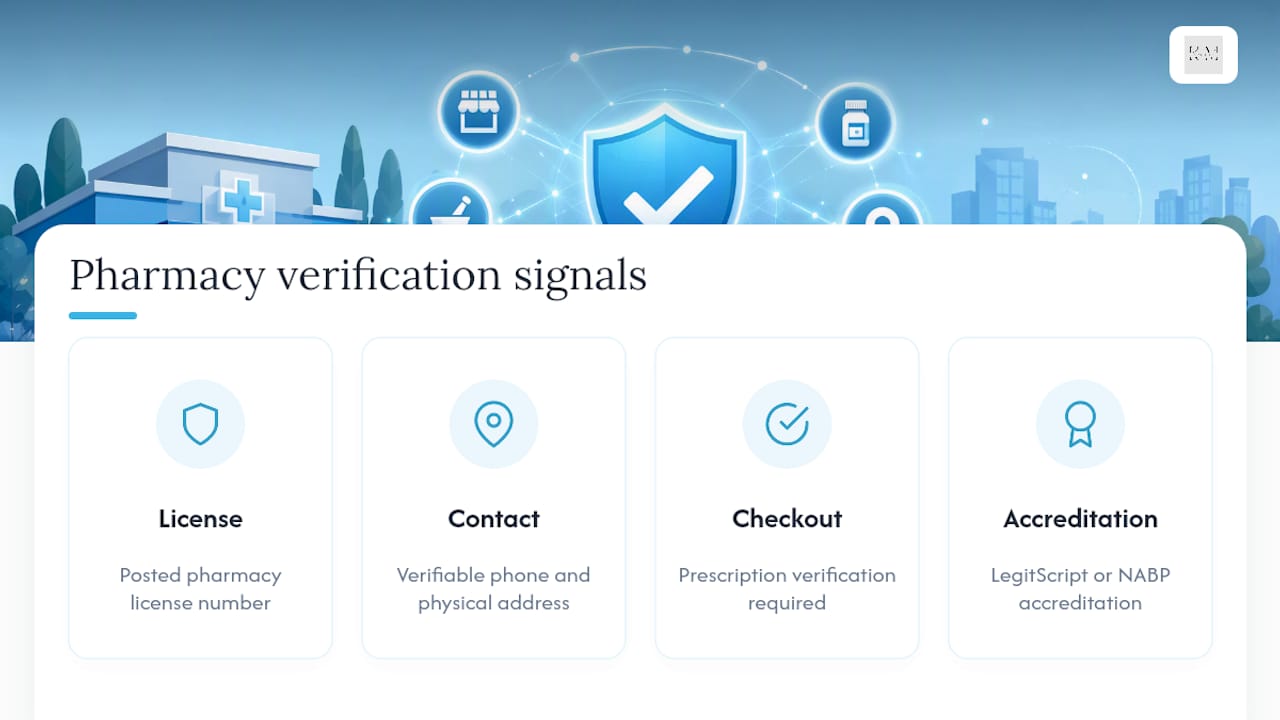
Legitimate signals worth checking before you advertise on behalf of, or link out to, any online pharmacy include a clearly posted pharmacy license number, verifiable contact information tied to a real physical address, and a checkout process that actually requires prescription verification rather than a simple checkbox. Third-party accreditation from LegitScript or the NABP Digital Pharmacy Accreditation program carries real weight with Google’s review team precisely because it means an outside body already vetted these same signals.
How Do You Apply for Google Healthcare Certification?
Getting certified is a documentation exercise more than a technical one, and most of the pain comes from picking the wrong category up front. Google’s own guidance flags category selection as one of the most common application mistakes, since “Online Pharmacy,” “Telemedicine,” and “Manufacturer” each carry different documentation requirements and different downstream keyword permissions.
Start by matching the category to what your business actually does, not what sounds closest. A telemedicine platform that also fulfills prescriptions through a partner pharmacy may need certification in both categories, not just one.
From there, third-party accreditation typically becomes the backbone of your application:
- LegitScript certification is widely requested for U.S. online pharmacies and telemedicine prescribers, and Google frequently references it directly in application guidance
- NABP Digital Pharmacy Accreditation serves a similar verification role and is often accepted as an alternative or complement to LegitScript
- Manufacturers generally don’t need pharmacy-specific accreditation but should expect requests for business registration and regulatory documentation instead
Build your document packet before you start the application, not during it. That typically means your pharmacy license, business registration, physical address verification, and either your LegitScript or NABP accreditation certificate. Timelines vary, but expect the review itself to take longer than a standard ad approval, often stretching into multiple weeks once third-party accreditation is factored in.
Pro Tip: Apply for accreditation before you touch your Google Ads account. LegitScript and NABP reviews run on their own clock, and starting your Google certification application while accreditation is still pending almost guarantees a denial you’ll have to appeal later.
If you’re denied, the fix usually isn’t a mystery. Common reasons include a landing page that still displays restricted terms outside an approved context, geo-targeting that includes regions your certification doesn’t cover, or missing documentation the reviewer couldn’t verify from your site alone. Fix the specific flagged issue, update your evidence packet, and reapply rather than resubmitting the identical application and hoping for a different outcome.
What Do Landing Pages and Ad Forms Need to Include?
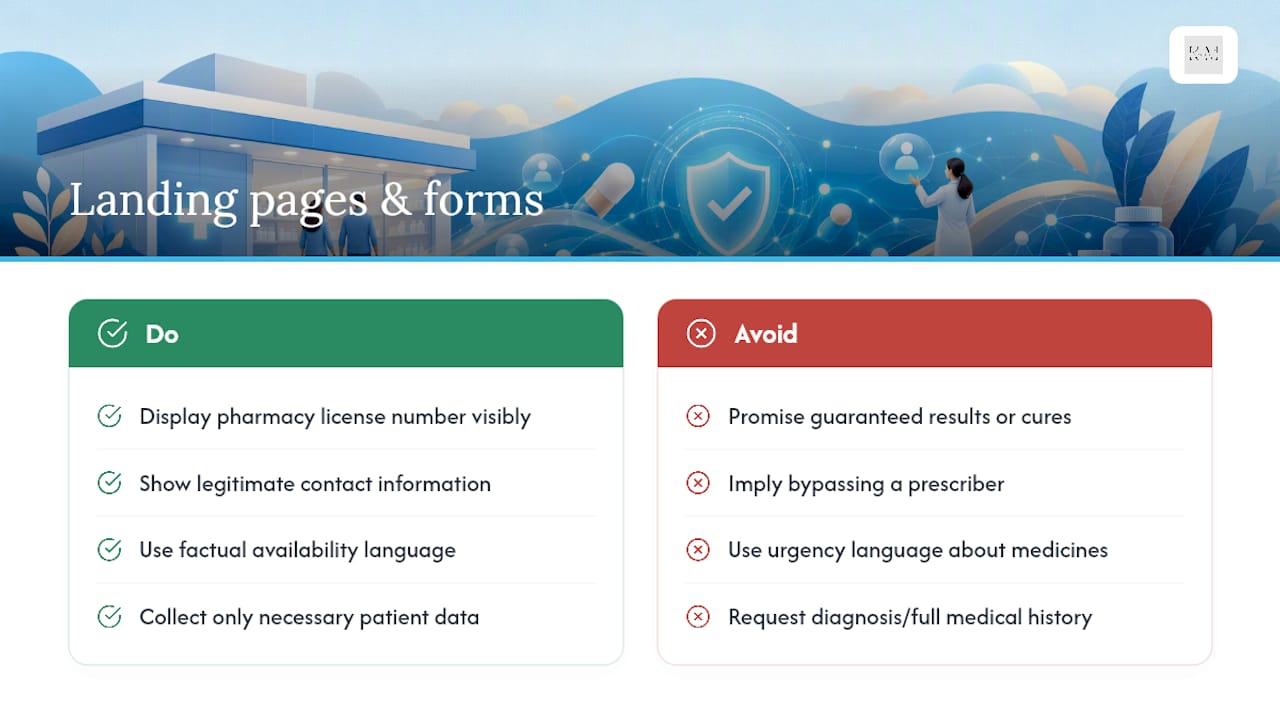
Your landing page carries as much compliance weight as your ad copy, sometimes more, and it’s the piece advertisers most often overlook. Deceptive claims are the fastest route to disapproval: promising guaranteed results, implying you can bypass a prescriber, or using urgency language (“order now before it’s too late”) around medication availability all read as red flags to Google’s reviewers.
Keep availability language factual. “Check current stock” works. “Guaranteed same-day fulfillment of any prescription” doesn’t, because you can’t actually guarantee that across every drug and every insurance situation. Your landing page should visibly display your pharmacy license number and legitimate contact information, the same signals reviewers check when verifying accreditation.
Forms deserve their own scrutiny. Collect only what you genuinely need for the interaction, since asking for diagnosis details or full medical history on a simple “request a refill” form both violates good HIPAA-aware design practice and raises unnecessary red flags with reviewers. Every form should sit behind a secure connection, link clearly to a real privacy policy, and avoid pre-filling sensitive fields that weren’t explicitly provided by the visitor. A HIPAA-compliant website structure built around this kind of minimal, secure data collection tends to sail through both Google’s review and any patient trust concerns at the same time.
On the ad side, call extensions and location assets generally carry less compliance risk than expanded text promoting specific drugs, and they convert well for local pharmacy searches anyway.
Why Do Pharmacy Ads Get Disapproved, and How Do You Appeal?
Disapprovals escalate in a predictable pattern: an individual ad gets flagged first, then specific keywords or assets get restricted account wide if the pattern continues, and repeated violations risk the account itself. Catching problems at stage one saves you from ever seeing stage three.
The most frequent triggers, based on what Google’s own guidance and agency reports both point to, come down to a short list:
- Keyword targeting of restricted drug terms without the required certification in place
- Landing page content referencing specific prescription drugs outside an approved, certified context
- Missing or expired third-party accreditation that Google can no longer verify against LegitScript or NABP records
- Geo-targeting mismatches, where campaigns reach regions the current certification doesn’t cover
When you get a disapproval notice, treat it as a diagnostic tool rather than a dead end. Pull the specific policy citation Google provides, fix that exact issue on the landing page or in the keyword list, and document what changed before you resubmit. Appeals filed through the Google Ads account interface move faster when they include evidence: a screenshot of the corrected landing page, an updated accreditation certificate, or a revised geo-targeting setting. Keep a running log of every disapproval and fix. Pharmacies that document this pattern rarely repeat the same mistake twice, because the log itself becomes a pre-launch checklist.
What Should Your Pre-Launch Compliance Checklist Look Like?
Turning all of this into an operational routine is where most independent pharmacies actually stumble, not in understanding the policy itself. Before any campaign goes live, run through a short, non-negotiable list:
- Confirm accreditation (LegitScript or NABP) is active and matches the certification category you’re applying under
- Audit your landing page for restricted terms, missing license numbers, or forms collecting more data than necessary
- Build your negative keyword list before launch, not after your first disapproval
- Set geo-targeting to match exactly what your certification covers, nothing broader
- Keep certified and non-certified campaigns in clearly separated structures so one issue can’t contaminate the other
Once live, prioritizing calls and store visits as your primary conversion signals tends to outperform website clicks alone for independent pharmacies, since most local prescription decisions still happen over the phone or at the counter. Layer in automated disapproval alerts so you catch problems within hours instead of during a monthly report, and put a weekly recurring block on the calendar just for negative-keyword review. It’s tedious. It’s also the single habit that separates accounts that scale smoothly from ones that keep getting stuck in review.
Pro Tip: Start every new pharmacy account with local, non-prescription campaigns first. It builds account history and trust with Google before you introduce the higher-scrutiny prescription-term targeting, and reviewers tend to move faster on accounts with a clean track record.
The Compliance Trade-Off Nobody Talks About Enough
Most guidance on this topic treats compliance and growth as opposing forces, where every restriction is framed as a limit on what you can achieve. That’s backwards. The pharmacies that get the most out of Google Ads over time are the ones that treat certification and accreditation as the foundation of their targeting strategy, not a tax on it, because certified accounts get access to keyword territory uncertified competitors can’t touch.
The real risk isn’t being too conservative early on. It’s rushing prescription-term targeting before the paperwork is settled, triggering a disapproval pattern that follows the account for months. Slower, documented, and boring wins here.
— Opinly
Get Certified and Run Compliant Pharmacy Campaigns With KLYR Media
Klyrmedia is the alternative to guessing your way through Google’s certification process. Instead of piecing together policy pages and hoping your landing page passes review, Klyrmedia builds the HIPAA-compliant website infrastructure your certification application needs, from secure forms to properly disclosed licensing information, so reviewers have nothing to flag.

Beyond the website itself, Klyrmedia manages the Google Ads side directly: structuring certified and non-certified campaigns separately, building the negative keyword lists that catch drift before it becomes a disapproval, and setting up marketing automation to track calls and store visits as your real conversion signals instead of guessing from click data alone. When an appeal is needed, having documentation already organized cuts the resolution time significantly. If your pharmacy is ready to apply for certification or clean up an account that keeps hitting disapprovals, reach out to Klyrmedia to start the audit and certification process today.
Where to Go for Official Policy Updates
Bookmark these before your next campaign launch, since policy details shift more often than most advertisers expect. The Healthcare and medicines policy page is the master document covering scope, business types, and enforcement. The Prescription drug services page breaks down certification categories and location rules in detail. The Restricted drug terms page explains exactly how keyword targeting and drug names interact.
For accreditation, LegitScript and the NABP Digital Pharmacy Accreditation program both publish their own verification requirements and application timelines directly on their sites, worth checking before you assume either process moves as fast as a standard business registration.
This article is general information, not a substitute for advice from a qualified doctor. Consult a qualified healthcare professional about your own circumstances before acting on anything here.

