

What Healthcare Schema Markup Should You Add First?

Add JSON-LD for MedicalClinic or MedicalOrganization, plus a MedicalWebPage on any content page that explains a condition, treatment, or service. Those two types cover most of what a provider site needs, and they’re the ones Google’s rich result systems actually parse.
Inside that markup, three properties do the heavy lifting:
isAcceptingNewPatients— tells search engines (and increasingly, AI assistants) whether it’s worth sending someone your way right now.medicalSpecialty— narrows your entity from “a clinic” to “a clinic that treats what this person searched for.”openingHours— the detail that ends more phone tag than any other field in your schema.
Once it’s live, run it through Google’s Rich Results Test and check that every value matches what’s visibly written on the page. Markup that claims something the page doesn’t say is the fastest way to get flagged, not featured.
TL;DR:
- Proper implementation requires matching specific schema types like MedicalClinic, Physician, or MedicalWebPage to each page’s purpose for maximum search benefit.
- Key properties such as isAcceptingNewPatients, medicalSpecialty, and openingHours must be kept accurate and validated regularly through testing tools to ensure eligibility for rich results.
- Using consistent identifiers and nested entity structures across multiple locations improves search engine understanding and prevents fragmentation of reviews and recognition.
- Markup accuracy depends on reflecting current, publicly visible content; over-tagging or outdated status information can undermine search result quality and credibility.
- Maintaining schema markup should be an ongoing process with regular audits, version control, and dedicated ownership to prevent drift and ensure compliance with evolving standards.
Table of Contents
- Why Healthcare Schema Markup Matters, and Where It Stops Helping
- The Core Schema.org Types Every Provider Page Needs
- How to Implement JSON-LD Schema, Step by Step
- Scaling Schema Markup Across Multiple Locations
- Pitfalls That Undermine Your Schema Markup
- Keeping Healthcare Schema Markup Current as Standards Evolve
- Handling Patient Data Safely Within Schema Markup
- What We Think Most Healthcare Marketers Get Wrong About Schema
- Get Your Healthcare Schema Markup Built and Maintained Correctly
- Key Takeaways
- Sources
Why Healthcare Schema Markup Matters, and Where It Stops Helping
Structured data hands search engines a cleaner read of who you are and what you offer. Instead of crawling paragraphs and guessing, a search engine (or an AI system summarizing local providers) gets explicit fields: specialty, hours, network affiliation, patient status. That’s the whole value proposition of healthcare schema markup in one sentence.
But it’s worth being precise about what schema.org actually is. It’s a vocabulary built for web discoverability, not a clinical data standard. It complements systems like SNOMED or RxNorm rather than replacing them, and Schema.org’s own health and medical documentation is explicit that these types exist to help webmasters mark up content for search, not to serve as an electronic health record.
So here’s the realistic scorecard:
- What improves: richer search result features, better odds of showing up for specialty and location queries, clearer differentiation between your clinic and the five others in your zip code.
- What doesn’t change: clinical accuracy, treatment recommendations, or anything resembling medical advice. Schema tells search engines what your page is about. It doesn’t and shouldn’t tell anyone what to do about a symptom.
Marketers who treat schema as an SEO lever, not a clinical statement, get the upside without the liability.
The Core Schema.org Types Every Provider Page Needs
Different pages need different types, and matching them correctly is where most implementations either succeed or quietly fail.
- Organization-level pages get
MedicalOrganizationor the more specificMedicalClinic. If you’re a single-location practice,MedicalClinicis usually the better fit because it’s more specific, and specificity is exactly what search engines reward. - Individual provider bios use
Physician, a subtype built for exactly this: name, specialty, affiliated organization, accepted insurance. - Condition and treatment content goes on
MedicalWebPage, which carries properties likemedicalAudienceandspecialtyso search engines can tell a patient explainer apart from a page written for referring clinicians. - Clinical or research content (case studies, published findings) fits
MedicalScholarlyArticle. - Drug and condition reference pages can use
DrugandMedicalConditiondirectly from the broaderMedicalEntityfamily, which supports linking to codes and related conditions when that data exists.
The properties that move the needle for patient-facing search are isAcceptingNewPatients, medicalSpecialty, healthPlanNetworkId, availableService, openingHours, aggregateRating, mainEntityOfPage, and medicalAudience. Of those, healthPlanNetworkId is the most underused. It lets you tell search engines which insurance networks you participate in, which is often the actual deciding factor for someone choosing between two similarly rated clinics.
If your organization already uses controlled vocabularies like MeSH, SNOMED, or RxNorm internally, you can reference those codes through identifier properties on MedicalEntity subtypes. It’s optional, but it strengthens the entity relationships search engines can draw between your content and established medical concepts.
Pro Tip: Don’t default to MedicalOrganization out of habit. If MedicalClinic or Physician fits, use it. Search engines reward the most specific type available, not the safest generic one.
How to Implement JSON-LD Schema, Step by Step
Here’s a compact example for a single-location clinic page that also functions as a MedicalWebPage:
{
  "@context": "https://schema.org",
  "@type": "MedicalClinic",
  "name": "Example Family Health Clinic",
  "address": {
    "@type": "PostalAddress",
    "streetAddress": "123 Main St",
    "addressLocality": "Springfield",
    "addressRegion": "IL",
    "postalCode": "62704"
  },
  "telephone": "+1-217-555-0198",
  "medicalSpecialty": "FamilyPractice",
  "isAcceptingNewPatients": true,
  "openingHours": "Mo-Fr 08:00-17:00",
  "mainEntityOfPage": "https://example.com/family-clinic"
}
Placement depends on your setup. Single-site practices can drop this in the page template or header. Multi-location groups need dynamic fields, pulling address, phone, hours, and isAcceptingNewPatients from a central data source so no location page goes stale when hours change.
Once it’s deployed, run this testing sequence:
- Validate with Google’s Rich Results Test to confirm the markup is parsed and eligible for enhanced listings.
- Cross-check with the Schema.org type definitions to confirm you’re using current property names.
- Read the rendered page side by side with the JSON-LD. Every claim in the markup should be visible, in plain language, somewhere on the page.
- Track Search Console performance for the affected pages over the following weeks. Rich result eligibility often shows up as a click through rate shift before it shows up in rankings.
| Testing Step | What You’re Checking |
|---|---|
| Rich Results Test | Whether markup is valid and eligible for enhanced search features |
| Schema.org type reference | Whether property names and types match current standards |
| Manual page comparison | Whether markup content matches visible page content |
| Search Console monitoring | Whether click-through rate or impressions shift post-deployment |
Scaling Schema Markup Across Multiple Locations
A single-clinic JSON-LD block doesn’t scale to a ten-location group without a plan, and this is where most healthcare marketing teams run into trouble first.
The fix is a nested entity model. Each location page gets its own MedicalClinic markup, and each one links back to a parent entity using parentOrganization. This structure tells search engines these aren’t ten competing businesses. They’re one organization with ten access points, and Schema App’s hospital-page guidance treats this pattern as foundational for larger healthcare sites.
Consistent identifiers matter more than most teams expect:
- Use the same DUNS number, LEI, or NAICS code across every location page and the parent organization page.
- Link provider profiles to both their specific location and the parent entity, so reviews and recognition don’t fragment across duplicate listings.
- Keep one canonical organization page, with location pages and provider profiles nested beneath it in both your sitemap and your internal linking structure.
Pro Tip: If two locations share a provider, mark that relationship explicitly on both pages. Search engines that can’t confirm it’s the same physician will sometimes treat the listings as two separate, less credible entities.
Pitfalls That Undermine Your Schema Markup
Most schema problems aren’t technical. They’re accuracy problems that technical validation won’t catch.
- Over-tagging. Marking a page as accepting new patients because the practice usually does, not because the page says so, is the single most common mistake. Schema.org’s own guidance is direct on this: markup should reflect what’s actually stated on the page, not what’s assumed to be true.
- Stale status fields. Hours change, provider availability changes, and
isAcceptingNewPatientsflips more often than most teams update it. - Audience mismatches. Tagging a clinician-facing research summary with a patient
medicalAudience, or vice versa, confuses the exact classification schema is supposed to clarify.
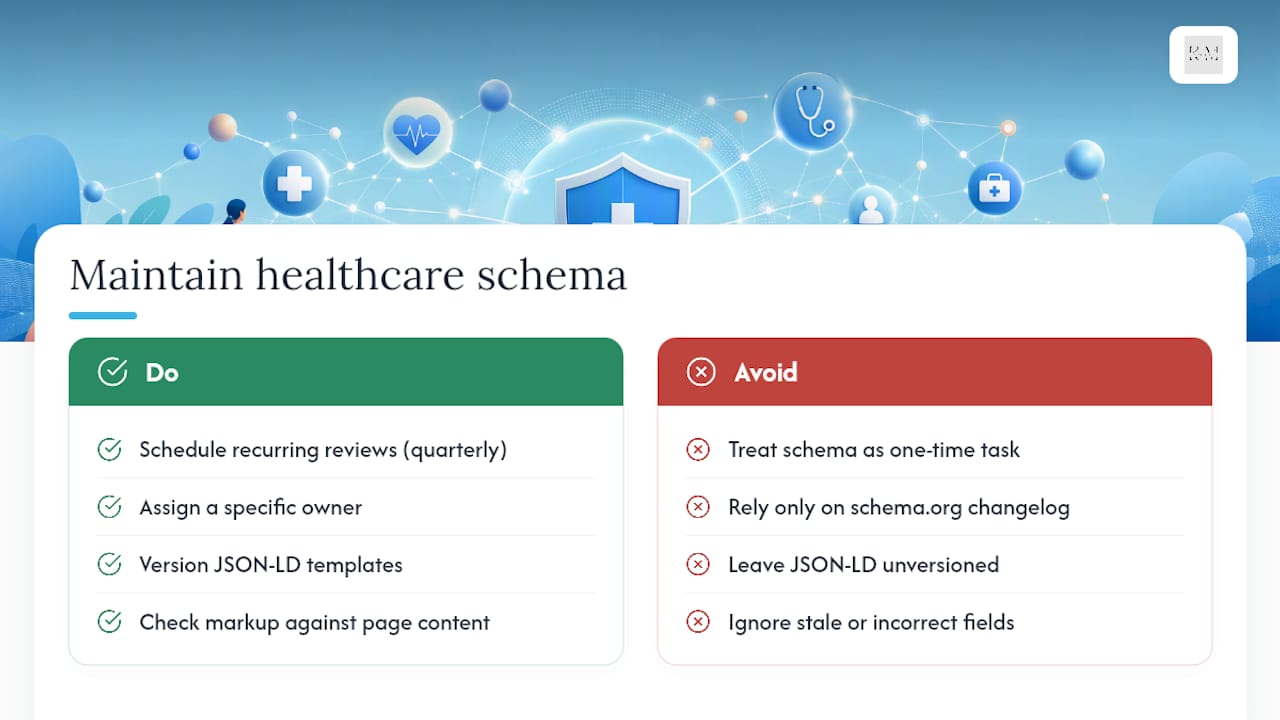
Governance solves most of this before it starts: assign clear ownership of who updates markup, version your JSON-LD templates, and schedule quarterly audits rather than discovering drift during a ranking dip. And never let markup make a clinical claim your on-page content doesn’t make. Use medicalAudience to signal who content is for, and link out to authoritative clinical sources rather than embedding treatment guidance directly in structured data.
Keeping Healthcare Schema Markup Current as Standards Evolve
Schema.org updates its vocabulary regularly, adding new properties and occasionally deprecating old ones. Search engines change how they parse and reward structured data on a similar rhythm. Markup that was best practice two years ago can quietly stop earning rich results today without ever throwing an error.
The practical fix is treating schema as a maintenance item, not a launch task. Set a recurring review, quarterly works for most multi-location groups, where someone actually checks the current Schema.org type definitions against what’s deployed on the site. New properties like refined audience or specialty fields show up more often than most teams notice, because nobody’s assigned to look.
Version your JSON-LD templates the same way you’d version any other code. When you update a property or add a new type, note what changed and when, so a future audit isn’t guesswork. This matters more for healthcare sites than most verticals because the cost of stale markup isn’t just a lost rich result. It’s a isAcceptingNewPatients field telling searchers something that stopped being true three months ago.
Search engine guidelines shift too, sometimes independent of schema.org itself. Google periodically changes which structured data types are eligible for which SERP features. Following Search Console alerts and Google’s own developer documentation alongside schema.org’s changelog gives you a fuller picture than watching either source alone. Treat markup updates the way you’d treat a technical SEO audit: scheduled, owned by someone specific, and checked against real page content every time.
Handling Patient Data Safely Within Schema Markup
Healthcare schema markup describes your organization, your providers, and your content. It should never describe an individual patient, and this line gets blurrier than teams expect once automation enters the picture.

The safest rule: if a field could identify a real patient, whether through a name, a testimonial, an appointment detail, or an aggregated statistic small enough to be traceable, it doesn’t belong in structured data. Aggregate review scores through aggregateRating are fine because they’re anonymized by design. A named patient quote embedded in a review schema, sourced without clear consent for that specific public use, is not.
This connects directly to HIPAA obligations, though schema markup itself sits outside HIPAA’s direct scope since it typically doesn’t touch protected health information. The risk shows up upstream, in how a site’s CMS or automation systems pull data into the markup in the first place. A patient management system that auto-generates schema fields from appointment records needs the same access controls and audit trail as any other system touching PHI, even though the schema output itself is just organizational metadata.
medicalAudience and speakable properties help here too. Marking content clearly for a patient audience, rather than letting search engines guess, keeps the line between public marketing content and anything resembling a patient record unambiguous. When in doubt, keep markup scoped to what’s true about your organization and your public-facing content, and leave anything patient-specific out of structured data entirely.
What We Think Most Healthcare Marketers Get Wrong About Schema
Most healthcare marketing teams treat schema markup as a one-time technical task, something a developer checks off during a site launch and nobody revisits. That’s backwards. The clinics seeing real gains from structured data treat it the way they’d treat their Google Business Profile: living information that needs updating the moment something changes on the ground.
The bigger miss, though, is accuracy discipline. Teams get excited about what schema could say, more specialties, more services, higher accepting-patients confidence, and end up tagging aspirational information instead of current, verifiable fact. That’s not an SEO optimization. It’s a data integrity problem wearing an SEO costume, and search engines are getting better at spotting the gap between markup and page content every year.
The gap between “add some schema” and “build a governed knowledge graph” is where most of the real visibility gains sit, and it’s also where most independent practices run out of internal bandwidth before running out of intent.
— Opinly
Get Your Healthcare Schema Markup Built and Maintained Correctly
Reading through implementation steps is one thing. Keeping JSON-LD accurate across a growing patient roster, changing hours, and new provider bios is a different job entirely, and it’s the job Klyrmedia was built around. As a digital marketing and web development partner working exclusively with independent pharmacies, medical clinics, and healthcare practices, Klyrmedia builds schema markup into HIPAA-compliant website design from the start, rather than bolting it on after launch.

That matters because most schema problems aren’t about knowing the syntax. They’re about keeping dozens of fields current across every location page without a system tracking them. Klyrmedia’s marketing automation services handle exactly that kind of ongoing data governance, syncing provider availability and hours so your isAcceptingNewPatients field never lies to a search engine. If your practice needs structured data that actually reflects what’s happening on the ground, request a site audit from Klyrmedia and see what’s currently misaligned on your pages.
Key Takeaways
Healthcare schema markup works best when specific Schema.org types match exact page purposes and every property reflects visible, current page content.
| Point | Details |
|---|---|
| Start with three properties | Add isAcceptingNewPatients, medicalSpecialty, and openingHours to your primary organization markup first. |
| Match type to page purpose | Use MedicalClinic for locations, Physician for providers, and MedicalWebPage for condition or treatment content. |
| Validate before publishing | Run every JSON-LD block through the Rich Results Test and compare it against visible page text. |
| Govern markup like code | Version templates, assign ownership, and audit quarterly to catch stale hours or accepting-patient status. |
| Get implementation help | Klyrmedia builds and maintains schema markup as part of HIPAA-compliant sites for independent healthcare practices. |
This article is general information, not a substitute for advice from a qualified doctor. Consult a qualified healthcare professional about your own circumstances before acting on anything here.

